onemanosx
-
Posts
1,550 -
Joined
-
Last visited
Everything posted by onemanosx
-
Bluetooth need to use kext. There is no DSDT solution
-
Is it from Olarila image? Perhaps you need to wait a little longer? It can happen due to quality of USB stick used.
-
[ref]Naveed Ahmad[/ref], Try DSDT.aml.zip
-
[ref]Naveed Ahmad[/ref], Find Device PXSX in RP06 and add in the script like in the picture Device (PXSX) { Name (_ADR, Zero) // _ADR: Address Method (_DSM, 4, NotSerialized) // _DSM: Device-Specific Method { If ((Arg2 == Zero)) { Return (Buffer (One) { 0x03 // . }) } Return (Package (0x0C) { "AAPL,slot-name", "PCI Slot", "built-in", Buffer (One) { 0x00 // . }, "model", Buffer (0x43) { "Broadcom Inc., BCM94352Z M.2 NGFF 802.11ac 867Mbps Wifi + BTLE 4.0" }, "name", Buffer (0x10) { "Airport Extreme" }, "device_type", Buffer (0x10) { "Airport Extreme" }, "compatible", "pci14e4,43a0" }) } }
-
[ref]Pluts[/ref], Need more info on your Dell 790 e.g CPU type, graphics card.
-
follow this guide https://Olarila.com/forum/viewtopic.php?p=59554#p59554 Cannot help without your USB detail I suggest you follow this guide first https://Olarila.com/forum/viewtopic.php?t=7370
-
[ref]M0001[/ref],
-
Guide - MSI B360 Gaming Arctic (Catalina)
onemanosx replied to onemanosx's topic in Guides and Tutorials
[ref]recash168[/ref], -
[ref]promaestro[/ref], good hack!
-
[ref]promaestro[/ref], HEY? Really? Show your ioreg tree. Which SSxx ports are working and which is not. Looking at your earlier reply, your working USB 3.0 ports should be SS01,SS03,SS04,SS05 and SS06. You might want to test again all your ports (both 2.0 and 3.0 devices). And since SS02 is not a USB 3.0 port, you can add SS02 in the exclude boot flag. Now that you already know how this works. You can do it on your own. Its a matter of "port elimination" to meet Apple's 15 port limitation.
-
Thank you for pointing this out. The correct flag is -uia_exclude_hs
-
Added in 2 minutes 51 seconds: [ref]promaestro[/ref], test ALL ports again using usb 3.0 device and report back with results. Use another USB 3.0 device if you have to as some USB 3.0 pen drive is not reliable. In 10.14.1, all USB ports patches are useless. You can disable all of them.
-
[ref]pi2in3[/ref], view video in post 1 or read post 4 https://Olarila.com/forum/viewtopic.php?p=65287#p65287 The below link is also a good resource for your understanding. https://Olarila.com/forum/viewtopic.php?p=66394#p66394 to implement your custom USB ports. USR1/USR2 is just a dummy port and can be ignored.
-
[ref]promaestro[/ref], Using the information you had given us, you can use the boot flag uia_exclude=HS02;HS07;HS13;HS14;USR1;USR2. Reboot and post ioreg here. Explanation on identifying USB 2.0 or USB 3.0 using ioreg can be read here: https://Olarila.com/forum/viewtopic.php?p=66394#p66394
-
Help I can only boot using this nv_disable=1
onemanosx replied to marvss4's topic in Guides and Tutorials
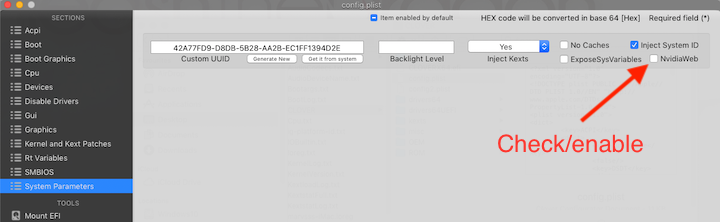
Try these steps. 1. uncheck/ disable intel in clover 2. Check/ enable nvidiawebdriver in clover 3. Go to bios and choose nvidia graphics to boot from
-
Help I can only boot using this nv_disable=1
onemanosx replied to marvss4's topic in Guides and Tutorials
nvidia card in laptop as optimus is not supported. You can only use intel integrated graphics. -
I have no idea what you are trying to do. Explain to us your port finding in detail and bootflag you are using.
-
You can say it is. Its an app with various links to essential post-installation guides and kexts. Definitely helpful for those with limited data plans and do not wish to go through search engine links
-
Guide Gigabyte Z68A-D3H-B3 (High Sierra 10.13.6)
onemanosx replied to onemanosx's topic in Guides and Tutorials
Congrats and enjoy your hack! -
[ref]promaestro[/ref], You must determine your unused ports with uia_exclude boot arg. If you watched the video or read the alternate guide in post 4, you will need ioreg app and uia_exclude boot arguments must be accompanied with unused port e.g uia_exclude=HS01 This is a process where user actions is required. We cannot assist if we do not know which ports you are using or not using.
-
-
Guide Gigabyte Z68A-D3H-B3 (High Sierra 10.13.6)
onemanosx replied to onemanosx's topic in Guides and Tutorials
Read point D, H and J from my guide -
Guide Gigabyte Z68A-D3H-B3 (High Sierra 10.13.6)
onemanosx replied to onemanosx's topic in Guides and Tutorials
Do not use multishit.