onemanosx
-
Posts
1,550 -
Joined
-
Last visited
Everything posted by onemanosx
-
make sure you delete all the kexts in S/L/E or L/E, rebuild permissions and reboot. I have not tried the latest clover yet, though.
-
[ref]thief_fighter[/ref], no idea with how usbinjectall kext reacts when placed in other than clover/kexts/other folder.
-
You will need bluetooth kexts https://bitbucket.org/RehabMan/os-x-brcmpatchram
-
[ref]yassernono2000[/ref], use only needed kexts in clover> kexts> other. Not in all version folders with many more conflicting kexts. No idea with using third party app for gestures.
-
[ref]Andy4Shurr[/ref], 1. With SSDT, you may specify details of the ports as being internal/external or a USB C type connection. Using boot arg + usbinjectall method, the port type is reliant on the injector kext itself. That's the only difference. 2. This method as well as any other guides using usbinjectall kext only applicable to xhc devices with intel chipset only. Thus, other chipset/controller does not fall under the 15 ports limitation, afaik.
-
-
[ref]yassernono2000[/ref], report back if you face issues
-
Nostalgic trip - Acer Aspire 4930G (macOS Mojave/Legacy)
onemanosx replied to onemanosx's topic in Guides and Tutorials
I guess someone will find this useful. Or maybe not! A working USB injector kext for ICH9 chipset. USBInjectAll works well for its all rounded purpose. But having a specific kext that calls the correct drivers is better I think. Read here on how you can make your own custom usb kext https://www.hackintosh-forum.de/forum/thread/33300-kext-as-kext-can-oder-usb-3-0-ohne-usbinjectall/ ICH9-USB.kext.zip -
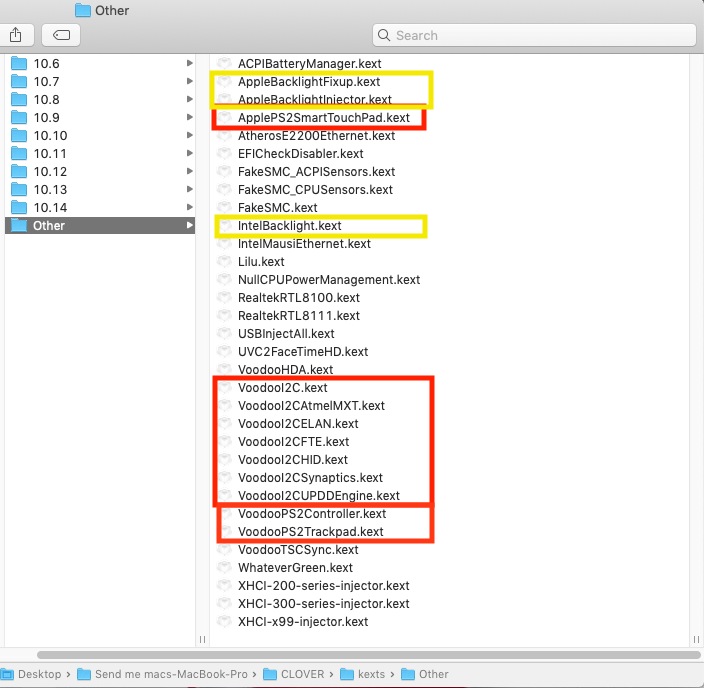
[ref]yassernono2000[/ref], 1. You have unnecessary and outdated applebacklight kexts. Whatevergreen has backlight brightness feature. 2. For trackpad, its either you use voodooi2c kexts or applePs2smartouchpad kext. not both. 3. I dont know why you even have voodoops2controller kext and where you got your voodoops2trackpad since you are using appleps2smartouchpad kext 4. You should clean up your usb injector kexts to suit your laptop 5. You should clean up your ethernet kexts to suit your laptop My suggestion, 1. delete all voodooI2C kexts and only use appleps2smartouchpad kext and see if trackpad works. 2. delete voodoops2controller and voodoops2trackpad kext 3. delete all applebacklight injector kexts 4. delete AtherosE2200ethernet, IntelMausiEthernet and realtek8100 kexts 5. delete nullcpupowermanagement kext 6. delete origin.dsl 7. delete SSDT-ACPIBATT.dsl 8. delete SSDT-BATC.dsl

-
Try wake method using keyboard/mouse. DSDT.aml.zip
-
Your patch may not be correctly implemented for I2C trackpad. Is the trackpad working? Upload a full dump of your system using Run_me app.
-
Intel HD 530 + GTX 950M : No graphics acceleration : very slow
onemanosx replied to gphuitcent's topic in Mojave (10.14)
you cannot use both Nvidia and Intel video-out simultaneously. -
check hardware and connection first
-
[ref]hellstens[/ref], use clover configurator to add device renames mentioned by Mald0n like this example.
-
Is it also possible that your bios has some configuration setting since this icon only appears after you install new graphics card?
-
My laptop that is equipped with an expresscard slot has that icon.
-
-
Sorry, cant be of further help to your specific Sony laptop. Gd luck!
-
I wont trust it
-
often it is the USB stick's fault for such slow progress or no progress at all. Recreate image or use a different usb stick.
-
if you are doing post install prior to installing OS, that is not the correct way. You are to install OS first then reboot to DosDude1 installer and do the necessary Post installation. Pretty sure you'll need to have a working Clover to boot dosdude1 as his installer is meant for real macs and does not contain clover bootloader.
-
set Intel virtualisation off and choose boot from USB in UEFI (if available) manually. I have had success booting image from an even older laptop, a core 2 duo system. So, I dont see how your laptop cant boot. Use a different USB port if its available (USB 2.0 is preferable)
-
Weird. Never had problems booting from image. You might want to look into your bios settings or flashing mobo bios if its available.
-
You can bypass the dsdt by going to to option>acpi and choose bios.aml at clover bootloader
-
Follow the updated second guide.