



oldman20
-
Posts
99 -
Joined
-
Last visited
Posts posted by oldman20
-
-
On 11/10/2022 at 9:20 PM, yus sak said:
@oldman20 could you teach me how to done this. Everytime I patch the OCLP 051, I end up with stuck at boot. Thank you ??
Your specs? And i guess you passed preinstall step? I don’t have issue with running OCLP
-
21 hours ago, MaLd0n said:
broadwell lose support
Done ✅

-
 1
1
-
-
Is EFI folder updated include for Ventura Broadwell?
-
this section for PCI-e slot right?
-
16 hours ago, MaLd0n said:
add ur video patch if need
attached file previous post, thank!
-
1 hour ago, MaLd0n said:
use default olarila efi folder for ur hardware and post one sendme
thank @MaLd0n, just "use default olarila efi folder" without modify anything for my CPU?
Here it is:
https://drive.google.com/file/d/1jjaYiC5Bp40w_jLu58qkRz96s3diQVgr/view?usp=sharing
-
after tried many times, still not working
I followed voodooi2c guide carefully:
- correct my ACPI ID is TPD1, and know my CPU is Broadwell no need GPI0 controller patch, and I2C Controller Patches?
- Windows Emulation patch will done with SSDT-XOSI.aml
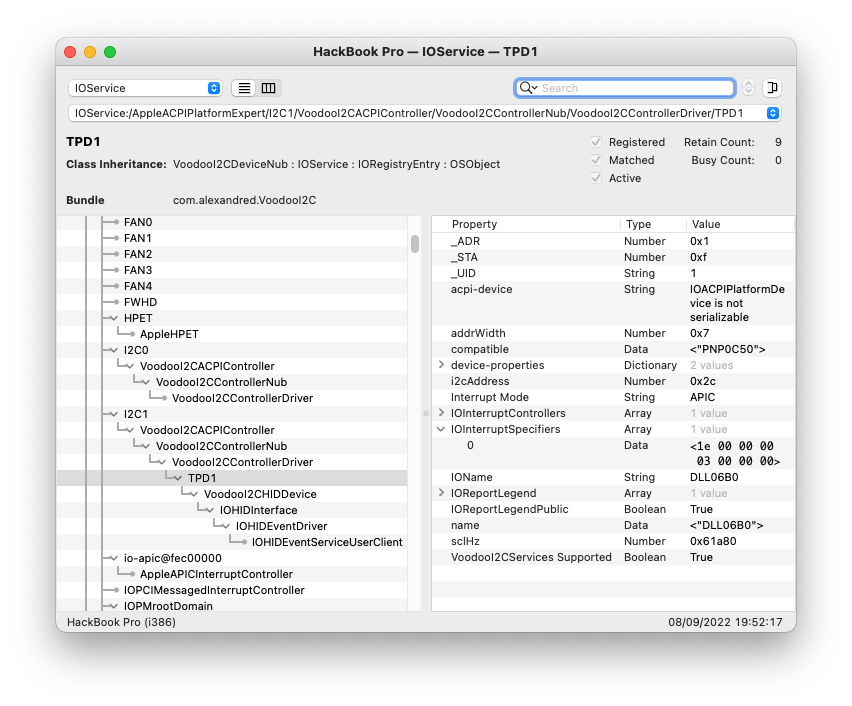
- Look at IOInterruptSpecifiers to know the hexadecimal APIC pin number is 0x1e mean 30 in decimal, less than 47, then can proceed to install kexts.
But at Step Ensure I2C Serial bus name is correctly labelled, I not sure about it. Here is original method from DSDT:
_SB.PCI0.I2C1.TPD1:
        Device (TPD1)
        {
            Name (_ADR, One)  // _ADR: Address
            Method (_HID, 0, NotSerialized)  // _HID: Hardware ID
            {
                If (LEqual (RDGI (0x35), One))
                {
                    Return (0xB0068C11)
                }
                Else
                {
                    Return (0xAF068C11)
                }
            }

            Name (_CID, "PNP0C50")  // _CID: Compatible ID
            Name (_UID, One)  // _UID: Unique ID
            Name (_S0W, 0x04)  // _S0W: S0 Device Wake State
            Method (_DSM, 4, NotSerialized)  // _DSM: Device-Specific Method
            {
                If (LEqual (Arg0, ToUUID ("3cdff6f7-4267-4555-ad05-b30a3d8938de") /* HID I2C Device */))
                {
                    If (LEqual (Arg2, Zero))
                    {
                        If (LEqual (Arg1, One))
                        {
                            Return (Buffer (One)
                            {
                                 0x03
                            })
                        }
                        Else
                        {
                            Return (Buffer (One)
                            {
                                 0x00
                            })
                        }
                    }

                    If (LEqual (Arg2, One))
                    {
                        Return (0x20)
                    }
                }
                Else
                {
                    Return (Buffer (One)
                    {
                         0x00
                    })
                }
                Return (Zero)
            }

            Method (_STA, 0, NotSerialized)  // _STA: Status
            {
                If (LEqual (And (SDS1, 0x08), 0x08))
                {
                    Return (0x0F)
                }
                Else
                {
                    Return (Zero)
                }
            }

            Method (_CRS, 0, Serialized)  // _CRS: Current Resource Settings
            {
                Name (SBFI, ResourceTemplate ()
                {
                    I2cSerialBusV2 (0x002C, ControllerInitiated, 0x00061A80,
                        AddressingMode7Bit, "\\_SB.PCI0.I2C1",
                        0x00, ResourceConsumer, , Exclusive,
                        )
                    Interrupt (ResourceConsumer, Level, ActiveLow, Exclusive, ,, _Y2A)
                    {
                        0x0000001E,
                    }
                })
                If (LEqual (GR13, One))
                {
                    CreateDwordField (SBFI, \_SB.PCI0.I2C1.TPD1._CRS._Y2A._INT, VAL3)  // _INT: Interrupts
                    Store (0x1B, VAL3)
                }

                If (LOr (LOr (LEqual (BID, 0x80), LEqual (BID, 0x82)), LEqual (BID, 0x83)))
                {
                    CreateDwordField (SBFI, \_SB.PCI0.I2C1.TPD1._CRS._Y2A._INT, VAL4)  // _INT: Interrupts
                    Store (0x1A, VAL4)
                }

                Return (SBFI)
            }
        }
I renamed SBFI to SBFB and remove:
                    Interrupt (ResourceConsumer, Level, ActiveLow, Exclusive, ,, _Y2A)
                    {
                        0x0000001E,
                    }
But can't compile, so I removed these too:
                })
                If (LEqual (GR13, One))
                {
                    CreateDwordField (SBFI, \_SB.PCI0.I2C1.TPD1._CRS._Y2A._INT, VAL3)  // _INT: Interrupts
                    Store (0x1B, VAL3)
                }

                If (LOr (LOr (LEqual (BID, 0x80), LEqual (BID, 0x82)), LEqual (BID, 0x83)))
                {
                    CreateDwordField (SBFI, \_SB.PCI0.I2C1.TPD1._CRS._Y2A._INT, VAL4)  // _INT: Interrupts
                    Store (0x1A, VAL4)
                }
Then compiled SSDT-TPD1.aml success (below attached files), put this SSDT-TPD1.aml in OC/ACPI and add to config.plist. Reboot and nothing change
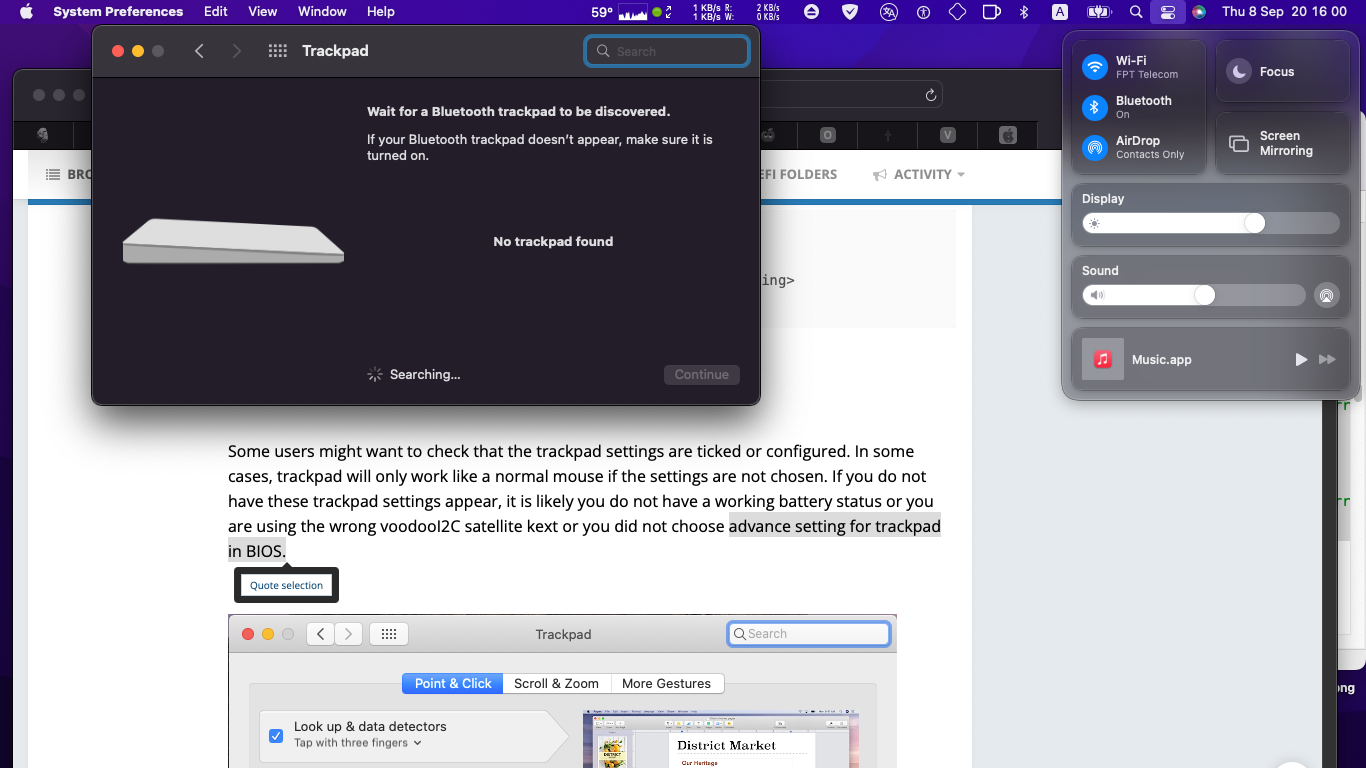
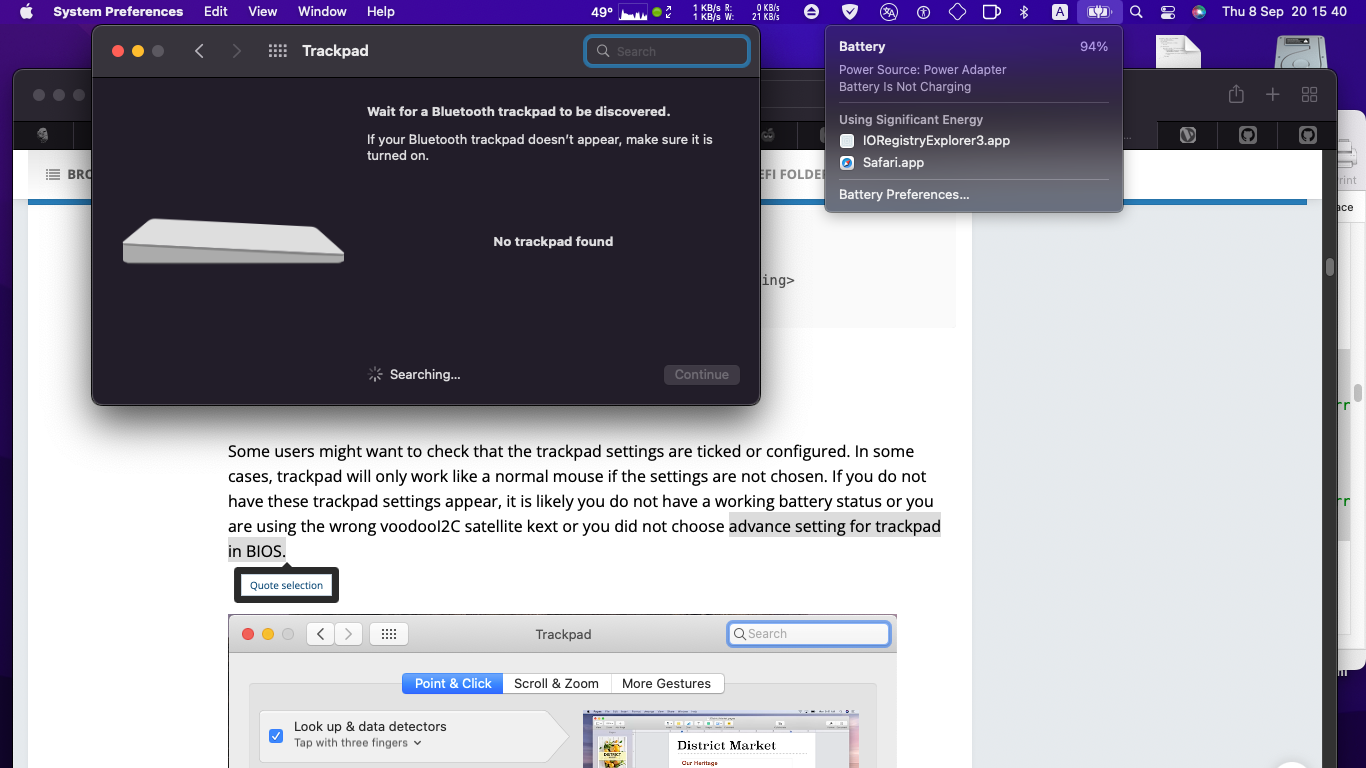
Trackpad work like mouse, but Trackpad setting not show in system preferences, and nothing advance setting for trackpad in BIOS. Battery status + brighter slide working well
In IOReg, TPD1 show Interrupt mode is APIC, and can't see GPI0 - which I understand no need for Broadwell CPU right?
What were I missing? thank and regards!
Without-SSDT-TPD1.ioreg
-
I done with linux supported and nice The Helper!
-
    Scope (_SB.PCI0)
    {
        Device (SDMA)
        {
            Method (_STA, 0, NotSerialized)  // _STA: Status
            {
                If (LEqual (SMD0, 0x02))
                {
                    Return (0x0F)
                }

                If (LEqual (SMD0, Zero))
                {
                    Return (Zero)
                }

                If (LLess (OSYS, 0x07DD))
                {
                    LPD3 (SB10, SMD0)
                    Return (Zero)
                }

                Return (0x0F)
            }
        }
    }
I tried all my best but cant pass this, any suggest? thank so much
-
4 minutes ago, MaLd0n said:
celeron don't have native support
u need try with fakecpuid
what's about my case, Ad?
-
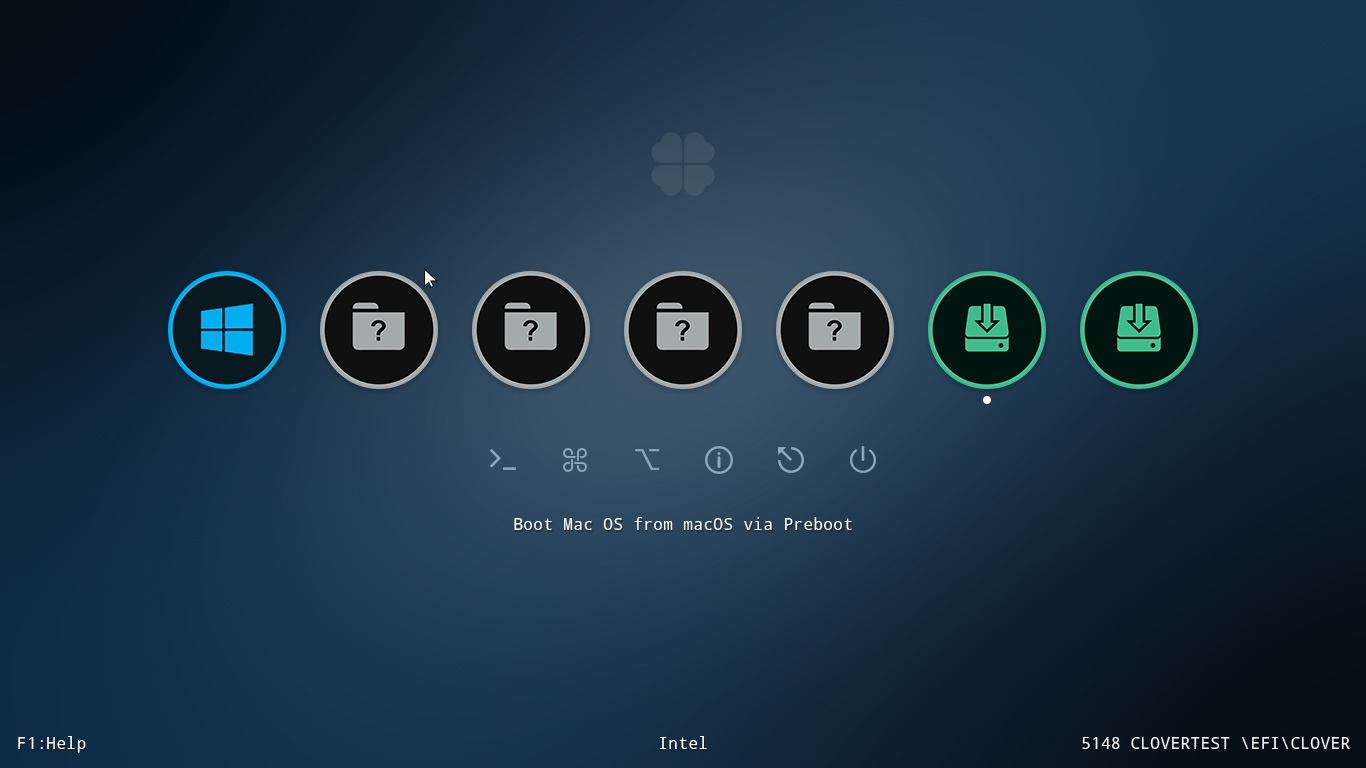
Anyone get blank screen no Clover GUI when has ApfsDriverLoader.efi and/or HFSPlus.efi in EFI\Clover\drivers\UEFI? It boot normal if load ApfsDriverLoader.efi manual in efi shell? Im running Clover 5148 latest version
I tried AppleAPFS.efi instead and just blank darkscreen like other APFS efi i have
Please see my attached screenshot below
Here Prelboot.log when boot from Clover until show GUI then press F2:
And this is log after load manual by hand APFSDriverLoader.efi in root USB: just boot into hackintosh normal
Load APFS+HFS manual in EFIShell.txt.zip
And the last: freezer blank blackscreen when add your AppleAPFS.efi in EFI/Clover/drivers/UEFI
BeforeLoadAPFSManual
AfterLoadAPFSManual_F3
AfterLoadAPFSManual
-
19 hours ago, MaLd0n said:
use Olarila efi folder for broadwell notebook. dell work with this battery way
https://www.olarila.com/topic/25111-hackintosh-efi-folders-for-all-chipsets-with-opencore-mod/
Olarila refi folder for Broadwell notebook has SMCBattery plugin inside VirtualSMC, but still so detail like ACPIBatteryManager

Olarila efi folder:
ACPIBatteryManager:
-
14 hours ago, MaLd0n said:
use only one kext for that
or ACPIBatteryManager.kext or SMCBatteryManager.kex
sr, that screenshot is missing, i already delete ACPIBatteryManager, used SMCBatteryManager and VirtualSMC for that
-
Hi MaLd0n
my ACPI EC registers 8 bit
         OperationRegion (ECOR, EmbeddedControl, Zero, 0xFF)
            Field (ECOR, ByteAcc, Lock, Preserve)
            {
                EC00,   8,
                EC01,   8,
                EC02,   8,
                EC03,   8,
                EC04,   8,
                EC05,   8,
                EC06,   8,
                EC07,   8,
                EC08,   8,
                EC09,   8,
                EC10,   8,
                EC11,   8,
                EC12,   8,
                EC13,   8,
                EC14,   8,
                EC15,   8,
                EC16,   8,
                EC17,   8,
                EC18,   8,
                EC19,   8,
                EC20,   8,
                EC21,   8,
                EC22,   8,
                EC23,   8,
                EC24,   8,
                EC25,   8,
                EC26,   8,
                EC27,   8,
                EC28,   8,
                EC29,   8,
                EC30,   8,
                EC31,   8,
                EC32,   8,
                EC33,   8,
                EC34,   8,
                EC35,   8,
                EC36,   8,
                EC37,   8,
                EC38,   8,
                EC39,   8,
                EC40,   8,
                EC41,   8,
                EC42,   8,
                EC43,   8,
                EC44,   8,
                EC45,   8,
                EC46,   8,
                EC47,   8,
                EC48,   8,
                EC49,   8
            }
Battery status and info power in system report fine with ACPIBatteryManager.kext 1.90.1 (latest)
But when I tried replace ACPIBatteryManager.kext with ECEnabler.kext + SMCBatteryManager.kext + VirtualSMC.kext, Battery status and info power in system info gone
I checked kexts loaded and missing SMCBattery, don’t know why?
% kextstat| grep -i -e Lilu -e ECEnabler -e SMCBattery Executing: /usr/bin/kmutil showloaded No variant specified, falling back to release 48 7 0 0x2f000 0x2f000 as.vit9696.Lilu (1.6.1) 7FE96C72-5555-3D86-BA9C-36D9177168FB <8 6 5 3 2 1> 53 0 0 0x8000 0x8000 com.1Revenger1.ECEnabler (1.0.3) 8C5BDAE0-6618-3F41-B0DC-B9A07648A117 <48 8 6 5 3 2 1> -
Hello MaLd0n
could you please spare some time to make one for me. Thank you.
https://drive.google.com/file/d/1XZQ5lAQt22UQUpLwjXodWqgOVNUgMuro/view?usp=sharing
RunMe-Output
||||||||||||||||||||||||
*----------------------*
  Welcome chuctran
*----------------------*
||||||||||||||||||||||||
*----------------------*
-----Send Me Files------
*----------------------*
||||||||||||||||||||||||
**********************************************************************************
Run .app and wait! Please don't touch your computer until the program is finished.
**********************************************************************************
****************************************************************************************************
Small donations via PayPal for build, patches and guides development would be extremely appreciated.
****************************************************************************************************
Kextstat...
Pmset Log...
Xcpm Log...
ACPI tables...
Kextload Log...
Executing: /usr/bin/kmutil showloaded
No variant specified, falling back to release
Executing: /usr/bin/kmutil showloaded
No variant specified, falling back to release
Executing: /usr/bin/kmutil showloaded
No variant specified, falling back to release
Executing: /usr/bin/kmutil showloaded
No variant specified, falling back to release
Executing: /usr/bin/kmutil showloaded
No variant specified, falling back to release
Executing: /usr/bin/kmutil showloaded
No variant specified, falling back to release
Executing: /usr/bin/kmutil showloaded
No variant specified, falling back to release
Executing: /usr/bin/kmutil showloaded
No variant specified, falling back to release
AudioDeviceName...
VDADecoder Checker...
ig-platform-id Log...
Ioreg Log...
Bootargs Log...
Kernel Version...
Audio Codecs...
Kernel Log...
System Version...
Full Kextstat Log...
Executing: /usr/bin/kmutil showloaded
No variant specified, falling back to release
Cpu Log...
IOBuiltin Log...
Boot Log...
Clover files (need administrator privileges)
Mounted EFI at /Volumes/ESP
cp: /Volumes/ESP/EFI/CLOVER: No such file or directory
Removing theme dir.
Removing tools dir.
Masking your System IDs
Dumped CLOVER files.
Removing Resources dir.
Removing Tools dir.
Masking your System IDs
Dumped OC files.
Unmounted /Volumes/ESP
Generating system info, this may take a while.
Saving IOReg...
0:80: execution error: Traceback (most recent call last):
  File "./tccutil.py", line 354, in <module>
    main()
  File "./tccutil.py", line 341, in main
    insert_client(item)
  File "./tccutil.py", line 232, in insert_client
    open_database()
  File "./tccutil.py", line 130, in open_database
    conn = sqlite3.connect(tcc_db)
sqlite3.DatabaseError: authorization denied (1)
-
The above error is easy to fix. Navigate to the VoodooPS2ControllerR6/contents/Plugins/
There are 2 kexts, open info.plist from both plugins and change com.apple.iokit.IOHIDSystem to com.apple.iokit.IOHIDFamily under OSBundleLibraries (My case has only replace)
-
1
-
-
Would you help me patch DSDT? Thank so much!
Result from Runme.app: https://easyupload.io/exo777
Dell Inspiron 3558 (UEFI) - Intel Core i5 (5th Gen) 5200U /2.20GHz - 8GB RAM DDR3L - Intel(R) HD Graphics 5500/ nVIDIA GeForce 920M - 1366x768 - Realtek ALC255 @ Intel Wildcat Point-LP PCH - High Definition Audio Controller [F0] - Intel(R) Dual Band Wireless-AC 3160 - Dell Touchpad /Synaptics - Samsung SSD 860 EVO 250GB (GPT)
Bios Version: A21 (Latest)
Currently, i cant enable sound and connect bluetooth, brighter slide not working! Boot with OpenCore 0.7.8 and Monterey 12.4
My hack cant boot with Clover, still find way to fix. Temporarily solution is put apfsdriverloader and hfs efi in root of USB boot Clover
-
thank so much Ad! support in new macOS version long time? maybe?
-
Just now, MaLd0n said:
this card work with
thank, both bluetooth? any idea if using BCM94360CS2 combo with adapter similiar picture above?
-
Hi all!
My specs in below signature, I think will buy BCM94352HMB, but it not native and maybe drop in feature? I thinking buy BCM94360CS2 but it not mPCIe, so is it can working normal when decide use BCM94360CS2 combo with converter like this? is it possible?
If not, any suggest?
Many thank!
-
On 4/22/2022 at 6:05 AM, 12Decades said:
Hi, could you please share your your EFI. Also what bootloader are you using?
have you same machine?
-
-
On 6/21/2020 at 2:13 AM, MaLd0n said:
a- If you need a full solution with one full DSDT patched, extract one SendMe with OpenCore running with this app and post here or in DSDT Patch Requests topic, check video first for extract with ioreg
can I do that when booted with Clover bootloader? or must OpenCore? as I know OC guide not recommended include DSDT.aml in ACPI folder?
-
1 minute ago, MaLd0n said:
die in monterey. need check other way
thank ad, looking amazing way!







macOS Ventura iso for Virtual Machine
in Virtual Machine ISO
Posted
tthank, i keep it to backup solution