ruglau
-
Posts
59 -
Joined
-
Last visited
Everything posted by ruglau
-
oh, ok, not so good, but I think I can postpone but the rear USB 3.0 are directly on mobo and doesn't work
-
You are a king. I have to copy these files on clover EFI folder (and so replace the old) or use your folder and delete mine folder? I also see that in your config.plist give to me you taken out the kext-dev-mode=1 and npci=0x2000 (were unecessary?) Your kext folder contain less kext, I have to delete mine extra? Added in 46 minutes 47 seconds: EDIT: I just copy your file and not delete mine. Just overwitten. (please say if I had to do) I add kext-dev-mode=1 and npci=0x2000 in your config cause I don't know if are necessary (please say also this ) but! YOU are really a King! cause I see the audio outputs now.... (but still not works, Maybe I have to test the layouts?) And also the boot on windows works good The monitor problems seems was a combination problem between this monitor and OSX, but I solved Now remain these problems: - USB 3.0 I followed your tips and yes now my 3.1 gen2 works, but no work for USB 3.0 in the rear and in the front of case (the front are cabled with a 19pin on mobo) - I don't know if it is a bullshit but I have 2 videocards one for windows and one for hack, is possible with 2 HDMI and a monitor with 2 source use NVDIA when I use Windows and use AMD when I use mac? - I followed the brightness key guide, but not works (is just for apple monitor or I can use also for an ASUS monitor?) - Power managment guide??? I really don't understand nothing :D but by the way, how can monitorating temperatures/fanspeed and I have to do something for Power managment and others things connected to that? (but maybe you just do something on my file IDK) Thanks again Maldon! surely as soon as the salary arrives I will see to thank you with a donation, at least as a thought
-
so good works! but only for 3.1 gen2. for the 2rear "3.0" and the 2front "3.0" (these last connected to the MoBo with 19pin cable) don't works. No drive recognize.
-
Here it is Send me Ruggeros-iMac.lan.zip
-
Sorry Guys for bother. I really want to say thanks to all your work! I decided to open a thread just because I'm very new on Hackintosh and I lose my self around all the forum discussions. I have just configured a pc with: Asus rog maximus hero XI z390 I9 9900k Rtx 2070 (which I will use only for Windows) And rx 580 (for the hack) 2 m2 nv 970pro and 970 evo respectively for windows and for osx What I want for this Hack? - A dual boot OSX/WIN on 2 Different SSD and 2 different Video Cards that boot respectively on mac or windows (RX580 on mac and RTX2070 on Win) Install AtherosE2200Ethernet.kext for TP-LINK TL-WDN4800 Wifi connection (works perfectly) Start, reboot and shutdown works perfectly I also send to you my DSDT file and patched it by you. But I really don't understand what it helps Now the problems: [list=] USB 3.0: I downloaded the InjectUSB files from your link downloaded notsupported from here: https://github.com/RehabMan/OS-X-USB-In ... orted.kext (hope I can link that link sorry if not) (cause I have a z390 MB) copy on EFI/EFI/Clover/Kexts/Other reboot But don't works noone of my USB3.0 works I can't download loreg cause isn't still available [list=] On clover boot if I click on Windows the system show an old Windows 10 logo with white square background and do nothing (I have 2 SO on 2 different SSD - What I have to do for dual bot on clover with 2 different SSD? [list=] I followed the brightness key guide, but not works (is just for apple monitor or I can use also for an ASUS monitor?) [list=] Power managment guide??? I really don't understand nothing :D but by the way, how can monitorating temperatures/fanspeed and I have to do something for Power managment and others things connected to that? [list=]Last but not least I can't see very well on my monitor: The word appear without antialiasing and also is all too saturated and contrasted. On windows with the second boot with de same monitor and the same VGA and the same profile monitor i see all good. Are there others things that I have not consider? I don't wanna burn my PC for failings Many Thanks to all and for next answer!

-
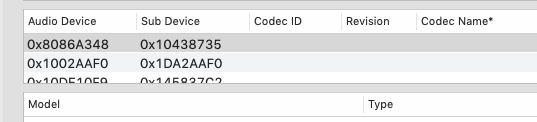
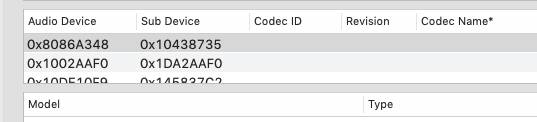
Thank Madon, but I'm very new here.. so I didn't understand good in that video Added in 20 minutes 6 seconds: also see at the pictures attached... first I could see realtek name, now just the 0x code..... I really lost the passage for this
-
Sorry Guys I'm very newbie and this method not work for me, surely I wrong something: downloaded the InjectUSB files from your link downloaded notsupported from here: https://github.com/RehabMan/OS-X-USB-Inject-All/tree/master/XHCI-unsupported.kext (hope I can link that link sorry if not) (cause I have a z390 MB) copy on EFI/EFI/Clover/Kexts/Other reboot I can't download loreg cause isn't still available is that right?
-
Hi! and thanks! in slot 1 I have a Nvdia RTX 2070 for windows use, so I have to put it in the first but thanks. The DSDT that u give me is for Audio? because if is for that, audio still don't works from motherboard The remain is good for you?
-
Hi everyone, and thanks for everything you do! I'm very newbie here, so I send you the SENDME file, can you help me what I have to do? (the system works very good) for now the problems are: -audio come out only from HDMI and can't use volume keys on keyboard -usb 3.0 and I think 3.1 don't works on front panel but only from direct onboard on moBo (EDIT: when I connect USB drive also on the direct mobo the drive is not recognize in Disk Utility and any else, but in the same USBPort the mouse unifyng wireless of logitech works good) Send me Ruggeros-iMac.lan.zip