hackadventure
-
Posts
9 -
Joined
-
Last visited
Everything posted by hackadventure
-
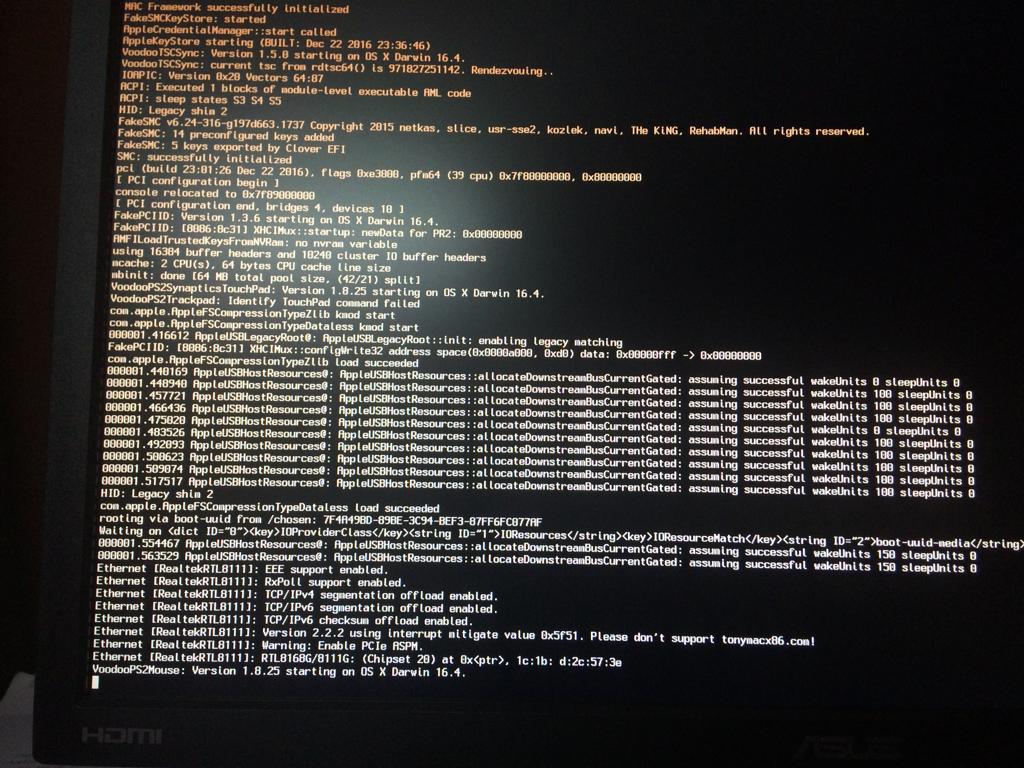
After waiting for more time and disabling Network adapter and Audio I get this...

-
I am still getting stalled at - using Mountain Lion Virtual ISO. No one has replied about my post since November 23rd.
-
Hackintosh Guide with Clover Bootloader on Serie 5, 6, 7, 8, 9
hackadventure replied to MaLd0n's topic in Installation Guides
the thing is I am still struggling with getting to the install screen on booting from USB. Even after removing kexts from /L/E folder on USB and the clover/kexts/others folder. It still comes to the part and stops. -
Hackintosh Guide with Clover Bootloader on Serie 5, 6, 7, 8, 9
hackadventure replied to MaLd0n's topic in Installation Guides
[ref]MaLd0n[/ref], I changed the contents of clover folder with the one you provided at the beginning of this post i.e., on pg one. So on press barspace I get the kexts that is set. So, according to your instructions I just press barspace in clover screen and unselect the ones pre-chosen, right? There is an option to boot without selected kexts. I even chose that option but I still could not get to the install screen. -
Hackintosh Guide with Clover Bootloader on Serie 5, 6, 7, 8, 9
hackadventure replied to MaLd0n's topic in Installation Guides
[ref]MaLd0n[/ref], I have a HFSExplorer in Windows and I understood what L/E and S/L/E is. It is Library/Extension and System/Library/Extension folders that have *.kext in them. So how do I remove or block so many of them? I found the VoodooPS2Controller.kext that was stopping my progress into the install in the clover/kexts/others folder and removed it. I am doing all this on one PC so I have to boot and reboot so many times. -
Hackintosh Guide with Clover Bootloader on Serie 5, 6, 7, 8, 9
hackadventure replied to MaLd0n's topic in Installation Guides
[ref]MaLd0n[/ref], I don't think I understand what is and I can only access the clover partition on windows not the installation partition which is hfs partition. -
Hackintosh Guide with Clover Bootloader on Serie 5, 6, 7, 8, 9
hackadventure replied to MaLd0n's topic in Installation Guides
Sure, I came to read more on this and found you had answered. I am really happy for this quick reply. Thank you MaLd0n. I changed the DSDT.aml to DSDT02.aml in config.plist in CLOVER folder on USB. Added in 25 minutes 35 seconds:
-
Hackintosh Guide with Clover Bootloader on Serie 5, 6, 7, 8, 9
hackadventure replied to MaLd0n's topic in Installation Guides
My system info: [*]Motherboard: GA-H81M-S; Processor: G3240; RAM: 6GB; GPU: NVidia GT-710 1GB HDMI port connected to monitor. I replaced files in my USB with yours as instructed. On booting from the USB the screen stops at: I waited to see what would happen and I got garbled text on the screen and the No Entry sign in the center of the screen. How do I overcome this? -
The virtualbox machine is reaching the and then the virtual machine stalls. It does not move ahead after waiting. What do I do?