erroruser
-
Posts
521 -
Joined
-
Last visited
Everything posted by erroruser
-
look through an see that you have a dsdt file you can not use a dsdt file for installation as they are only for one system
-
boot from f8 then uefi usb an make sure your bios is updated to current Load Optimized Defaults If your CPU supports VT-d, disable it If your system has CFG-Lock, disable it If your system has Secure Boot Mode, disable it Set OS Type to Other OS If your system has IO SerialPort, disable it Set XHCI Handoff to Enabled
-
unzip restore with win32diskimager then boot with bios boot manager an select uefi usb
-
you do not need to replace the clover untill after install
-
the 590 has no support for legacy uefi only you'll have to find what is legacy compatible
-
this clover will work for you an you can rest by saving yours a copy keep usb handy for incase https://Olarila.com/files/Clover.Folder/CLOVER.SERIES.100.200.300.zip set smbios to imac 18,3 or imac pro 1,1 then when dsdt completed put in efi/efi/clover/acpi patched folder
-
you do not need a mac read guide it tell you how to

-
did you install with unishit? yes? that is causing your issues it is crap reinstall with http://Olarila.com/forum/viewtopic.php?f=51&t=6743
-
http://Olarila.com/forum/viewtopic.php?f=19&t=1131
-
now try EFI.zip
-
[ref]seje.1[/ref], now try EFI.zip
-
Just installed a new i9 9900k processor
erroruser replied to j1mcrane's topic in High Sierra (10.13)
[ref]biscas[/ref], if your not showing the i9990k in about mac use this metthod http://Olarila.com/forum/viewtopic.php?t=8576 fo power managent possibly the dsdt will help an request here http://Olarila.com/forum/viewtopic.php?f=19&t=1131 -
[Help] Hackintosh Restarts Sometimes
erroruser replied to balikci922's topic in Guides and Tutorials
those patches do not work watch this video "> an read info for full write up or follow this guide https://www.insanelymac.com/forum/topic/335018-hackintool-v177/ -
yay a shortcut no more using the site well kinda somethings lol https://www.idownloadblog.com/2017/01/13/how-to-modify-about-this-mac-hackintosh/ but cant use the change pic options but rest works
-
[Help] Hackintosh Restarts Sometimes
erroruser replied to balikci922's topic in Guides and Tutorials
read here https://Olarila.com/forum/viewtopic.php?f=79&t=7370 -
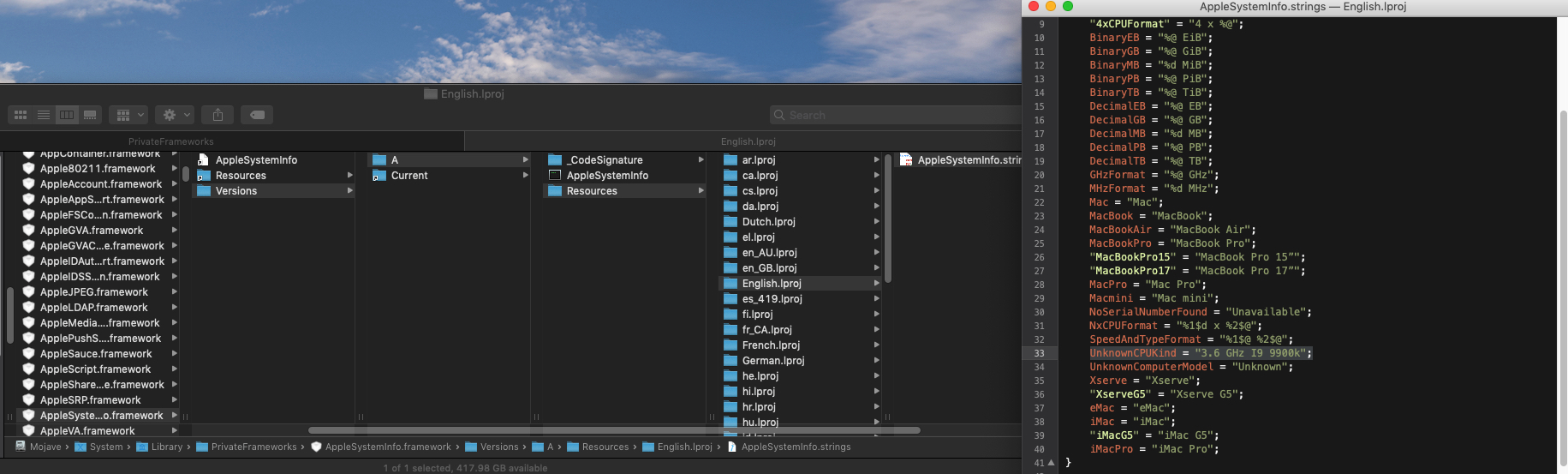
im on 10.14.2 an is working in mine as i showed the pic, also i never believe anything from tonycrap only system logo has a different way of editing Added in 30 minutes : try an edit en_gb folder an see
-
try in your own language as english is my primary an your may differ
-
1) Open a Finder window, navigate to the System folder, and then to the Library folder inside. (Not the “Library” folder we visited in the Model name section). 2) Inside Library, go to PrivateFrameworks, and find AppleSystemInfo.framework 3) Inside this framework, navigate to /Versions/A/Resources/. Then find the folder for your system language. If yours is English, go to English.lproj. 4) Inside that folder, find the file AppleSystemInfo.strings. Copy the file, and paste one somewhere as a backup. Then paste another copy to your Desktop to edit. Do not try to edit the file in place, it will not work. 5) Right-click the copy on your Desktop and open it with your editor of choice use textmate https://macromates.com/
-
to fix unknown cpu https://www.idownloadblog.com/2017/01/13/how-to-modify-about-this-mac-hackintosh/
-
use carbon copy clone like i mentioned above in last comment i made an copy your efi also to a safe place
-
[ref]ivandmpk[/ref], use carbon copy to make a back up first an make sure kexts are up to date before attempting any updates use this app to help you with kexts https://bitbucket.org/profdrluigi/kextupdater/downloads/
-
Nvidia Web Driver updates for macOS Sierra
erroruser replied to MaLd0n's topic in NVIDIA Web Drivers
[ref]ccphuc2019[/ref], there are no webdrivers for mojave -
you can it just takes patience an try this clover CLOVER.zip
-
to get usb 3 working read info for full guide in this video "> for graphics read here https://www.insanelymac.com/forum/topic/335018-hackintool-v177/
-
you use these ig platform id http://Olarila.com/forum/viewtopic.php?f=62&t=7164&fbclid=IwAR2oLhzZ6SUKcIeFmgLDceeG0h3TR6sXP5bdax50ooNBbWi2XX9f45S8xkw