artur-pt
-
Posts
4,990 -
Joined
-
Last visited
Everything posted by artur-pt
-
hello try to boot always until solve ati 5470 -v GraphicsEnabler=No and the other parameters u have try but GraphicsEnabler=No http://Olarila.com/forum/viewtopic.php?f=18&t=736 good hack
-
olá boa noite tenta este forced edit DisplayProductID-717.zip bom hack
-
Como usar o DVD 1 - Faça o boot do DVD e instale. Se precisar, prima F8 para opções avançadas do Chameleon, exemplos: -v (verbose boot) -x (safe) -s (single user) GraphicsEnabler=yes (ativa os drivers da gráfica) USBBusFix=yes (resolve problemas com dispositivos USB) npci=0x2000 (use se o boot parar em "PCI configuration begin") Vai precisar no minimo de uma partição livre, use Utilitário de Disco (no menu Utilitários) para a apagar como Mac OS Expandido (Reg. Cronológico). Se quiser instalar o Chameleon (boot loader) na partição e se usar MBR (em vez de GUID, será o caso se já tiver instalado o Windows no HD), a partição terá de ser primária, não poderá ser uma partição estendida/lógica. Aguarde pelo fim da instalação e reinicie. Se a barra de progresso parar de ser atualizada, apenas mova o rato. Dependendo da sua gráfica, usar GraphicsEnabler=yes resolverá este problema. 2 - Faça o Boot do DVD, prima F8 e selecione o HD para boot (não selecione o DVD de novo). Se usar um teclado PS/2 ou um laptop (que geralmente tem interface PS/2) o Assistente de Configuração vai pedir para ligar um teclado USB, se possuir um basta ligá-lo para passar este teste e em seguida desligá-lo e usar o PS/2. Se não tiver acesso a um teclado USB pode editar em /System/Library/CoreServices/Setup Assistant.app/Contents/Info.plist e remova as linhas <string>DeviceSection</string> <string>KeyboardTypeSection</string> Faça o boot usando -s (single user) e execute mount -uw / vi /System/Library/CoreServices/Setup\ Assistant.app/Contents/Info.plist Posicione o cursor na linha a remover e . Repita para a outra linha. e reboot. Problema com Intel HD 3000 http://Olarila.com/forum/viewtopic.php?f=10&t=1339 3 - Instale o Chameleon e a pasta Extra no HD. Recomendo o uso do Chameleon Wizard para instalar e criar/configurar org.chameleon.Boot.plist e SMBIOS.plist na pasta /Extra. http://www.insanelymac.com/forum/index.php?showtopic=257464 Pode também transferir um instalador ou os binários http://Olarila.com/forum/viewtopic.php?f=9&t=70 4 - Instale as kext essenciais e outras que necessite (rede, áudio, etc). FakeSMC.kext indespensável. http://www.mediafire.com/?yjto53r0p94422y Enquanto não arranjar a gestão de energia do seu cpu precisa de usar NullCPUPowerManagement.kext. http://www.mediafire.com/?uwvnvztwtna Se usar um teclado PS/2 ou um laptop use VoodooPS2Controller.kext (ou ApplePS2Controller.kext) e AppleACPIPS2Nub.kext. http://www.mediafire.com/?jw9zk6i2d4m2vvd Recomendo o uso de Kext Wizard na instalação de kexts. http://www.insanelymac.com/forum/index.php?showtopic=253395 Como o Lion usa kernel cache em vez de Extensions.mkext, recomendo ativar UseKernelCache no Chameleon e instalar todas as kexts em /System/Library/Extensions. Quando é usado o kernelcache, a pasta Extensions e mkext em /Extra são ignoradas. Se não ativar KernelCache, o Chameleon vai ler todas as kexts sempre em cada boot (como quando usa -f ignore caches), o que torna o boot lento. Recomendo a leitura deste tópico se pretende optimizar o seu hackintosh, ativar a gestão de energia, sleep a trabalhar, etc. http://Olarila.com/forum/viewtopic.php?f=7&t=646
-
olá podes testar as outras k estão na imagem e qualquer outra k keiras testar assim nos comandos de boot porque se der problema n ficas pendurado com a framebuffer errada. e voltas a repetir o boot mas tens de testar sem o externo ligado mas acredito k terás de testar o forced EDID bom hack
-
olá os framebuffers estão no controlador e podes so meter no boot para n teres problemas onde metes -v AtiConfig=Hoolock em vez de estares a meter no org.chameleon.boot.plist até saberes qual o correcto para ti bom hack

-
olá bom dia enquanto a kext da controladora n for carregada, não vai funcionar para sacar a EDID também podes usar isto http://www.madrau.com/indexSRX4.html e vê ai meu sistema
-
olá boa noite pelo k percebi a placa funciona perfeitamente em monitor externo ? já tentaste a ultima parte do tópico, que é o k eu uso no meu note forced edid não é muito dificil de fazer só tens de obter essa informação do teu monitor interno bom hack
-
olá quanto à ati lê com atenção o tópico e vê se teu device id está na kext ati5000Controller e atiradeonx3000 porque tem lá como ver e editar a kext. bom hack
-
olá bom dia vê isto http://www.insanelymac.com/forum/index.php?showtopic=269425&st=20&p=1756529&hl=smartie77&fromsearch=1entry1756529 e tenta ver se cumpres todos os procedimentos bom hack
-
olá bom dia essas kext são de sistema estão em /System/Library/Extensions/ bom hack
-
olá para a placa funcionar perfeitamente tem de ser carregadas as 3 kext ati5000controller atiradeon3000 atisupport são carregadas as 3 no boot podes ver com kextstat no terminal tentaste o force EDID bom hack
-
olá boa noite quanto à ati lê isto http://Olarila.com/forum/viewtopic.php?f=2&t=716 bom hack
-

Instalação do Snow Leopard em Placas-Mãe Gigabyte
artur-pt replied to MaLd0n's topic in Guias & Tutoriais Hackintosh
olá bom dia para essa config tens de usar imac12,1 http://Olarila.com/forum/viewtopic.php?f=2&t=223 e se tens dsdt gerado deves apagar nullcpupowermanagement para teres gerenciamento de energia nativo http://Olarila.com/forum/viewtopic.php?f=2&t=34 Chameleon usa isto para instalar e configurar http://www.insanelymac.com/forum/index.php?showtopic=257464 bom hack -
[DSDT REQUEST] Gigabyte 890FXA-UD7 - 1090T
artur-pt replied to chryslagu's topic in DSDT & Patch Requests
hello the problem is with your graphics try to boot -v GraphicsEnabler=No good hack -
olá bom dia tenta ver aki como habilitar tua gráfica http://Olarila.com/forum/viewtopic.php?f=2&t=716 bom hack
-
Dicas de utilização do Terminal
artur-pt replied to oldnapalm's topic in Guias & Tutoriais Hackintosh
olá bom dia tenta ver aki bom hack
-
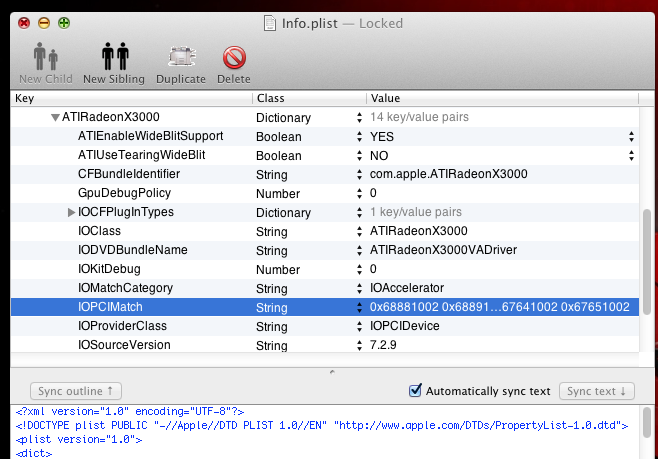
For any of the ATI graphics card work correctly on Mac OS X must be loaded the kexts ATIxxxxController (kext for the graphics controller) ATISupport (kext responsible for supporting the ATI in mac os x) ATIRadeonXxxxx (kext responsible for graphics acceleration) update: OS X 10.8 introduction of new kext: AMDRadeonAccelerator.kext that will replace the ATIRadeonx3000 the provision of kext editing is by families in my case is the Cedar http://en.wikipedia.org/wiki/Evergreen_(GPU_family) you need to know your graphics familly and edit in the familly with Vendor Id and Dev ID ex : (0x100268E0) update : 10.8.3 new kext ati7000controller to give support to the new amd series 7xxx, basically the procedure is the same explain before, the amdradeonaccelerator is responsible to give acceleration, and have new graphics family to the new and 7xxx or ATIRadeonX4000 to give the acceleration. Chameleon GraphicsEnabler Yes It may eventually be loaded another kext ATIFramebuffer Chameleon AtiConfig name of Framebuffer Kext/System/Library/Extensions/ATI2400Controller.kext/Contents/MacOS/AMD2400Controller Personality: Iago ConnectorInfo count in decimal: 2 Disk offset in decimal 130880 0000000 02 00 00 00 40 00 00 00 09 00 00 00 00 01 00 12 0000010 00 10 00 00 16 00 00 00 c4 00 00 00 10 00 01 11 0000020 Kext/System/Library/Extensions/ATI2600Controller.kext/Contents/MacOS/AMD2600Controller Personality: Hypoprion ConnectorInfo count in decimal: 2 Disk offset in decimal 130848 0000000 02 00 00 00 40 00 00 00 09 00 00 00 00 01 00 12 0000010 00 10 00 00 16 00 00 00 c4 00 00 00 10 00 01 11 0000020 Personality: Lamna ConnectorInfo count in decimal: 2 Disk offset in decimal 130880 0000000 00 02 00 00 14 00 00 00 80 00 00 00 00 01 02 11 0000010 04 00 00 00 16 00 00 00 80 00 00 00 00 10 01 12 0000020 Kext/System/Library/Extensions/ATI3800Controller.kext/Contents/MacOS/AMD3800Controller Personality: Megalodon ConnectorInfo count in decimal: 3 Disk offset in decimal 130896 0000000 00 02 00 00 14 00 00 00 00 00 00 00 00 01 02 11 0000010 04 00 00 00 16 00 00 00 00 00 00 00 00 10 01 12 0000020 80 00 00 00 02 00 00 00 04 00 00 00 00 10 00 00 0000030 Personality: Triakis ConnectorInfo count in decimal: 2 Disk offset in decimal 130944 0000000 00 02 00 00 14 00 00 00 00 00 00 00 00 01 02 11 0000010 04 00 00 00 16 00 00 00 00 00 00 00 00 10 01 12 0000020 Kext /System/Library/Extensions/ATI4600Controller.kext/Contents/MacOS/AMD4600Controller Personality: Flicker ConnectorInfo count in decimal: 3 Disk offset in decimal 126672 0000000 00 04 00 00 00 04 00 00 00 01 00 00 02 01 03 05 0000010 00 04 00 00 00 04 00 00 00 01 00 00 01 00 02 02 0000020 00 02 00 00 14 02 00 00 00 01 00 00 00 10 01 04 0000030 Personality: Gliff ConnectorInfo count in decimal: 3 Disk offset in decimal 126720 0000000 02 00 00 00 40 00 00 00 09 01 00 00 02 01 00 03 0000010 02 00 00 00 00 01 00 00 09 01 00 00 20 01 02 02 0000020 00 04 00 00 04 06 00 00 00 01 00 00 10 00 01 01 0000030 Personality: Shrike ConnectorInfo count in decimal: 3 Disk offset in decimal 126768 0000000 02 00 00 00 40 00 00 00 09 01 00 00 02 01 00 03 0000010 02 00 00 00 00 01 00 00 09 01 00 00 20 01 02 02 0000020 00 04 00 00 04 03 00 00 00 01 00 00 10 00 01 01 0000030 Kext/System/Library/Extensions/ATI4800Controller.kext/Contents/MacOS/AMD4800Controller Personality: Cardinal ConnectorInfo count in decimal: 2 Disk offset in decimal 126704 0000000 00 02 00 00 14 02 00 00 00 01 00 00 01 01 01 04 0000010 04 00 00 00 14 02 00 00 00 01 00 00 00 10 02 03 0000020 Personality: MotMot ConnectorInfo count in decimal: 2 Disk offset in decimal 126736 0000000 00 04 00 00 04 01 00 00 00 01 00 00 10 00 02 03 0000010 04 00 00 00 14 02 00 00 00 01 00 00 01 11 01 04 0000020 Personality: Quail ConnectorInfo count in decimal: 3 Disk offset in decimal 126768 0000000 02 00 00 00 40 00 00 00 09 01 00 00 22 01 00 07 0000010 02 00 00 00 00 01 00 00 09 01 00 00 20 01 03 04 0000020 00 04 00 00 04 03 00 00 00 01 00 00 10 00 02 03 0000030 Kext/System/Library/Extensions/ATI5000Controller.kext/Contents/MacOS/AMD5000Controller Personality: Douc ConnectorInfo count in decimal: 2 Disk offset in decimal 165856 0000000 02 00 00 00 00 05 00 00 09 03 00 00 21 03 02 02 0000010 00 04 00 00 04 02 00 00 00 03 00 00 11 02 01 01 0000020 Personality: Langur ConnectorInfo count in decimal: 3 Disk offset in decimal 165904 0000000 00 04 00 00 04 06 00 00 00 01 00 00 21 03 04 02 0000010 00 04 00 00 04 06 00 00 00 01 00 00 11 02 01 01 0000020 04 00 00 00 14 02 00 00 00 01 00 00 02 04 05 03 0000030 Personality: Uakari ConnectorInfo count in decimal: 4 Disk offset in decimal 165952 0000000 00 04 00 00 00 04 00 00 00 71 00 00 12 04 04 01 0000010 04 00 00 00 14 00 00 00 00 71 00 00 01 12 01 03 0000020 00 02 00 00 14 00 00 00 00 71 00 00 00 00 06 05 0000030 00 08 00 00 00 02 00 00 00 71 00 00 22 05 05 04 0000040 Personality: Zonalis ConnectorInfo count in decimal: 6 Disk offset in decimal 166016 0000000 00 04 00 00 04 06 00 00 00 71 00 00 20 01 06 06 0000010 00 04 00 00 04 06 00 00 00 71 00 00 10 00 05 05 0000020 00 04 00 00 04 06 00 00 00 71 00 00 21 03 02 04 0000030 00 04 00 00 04 06 00 00 00 71 00 00 11 02 01 03 0000040 00 04 00 00 04 06 00 00 00 71 00 00 22 05 04 02 0000050 00 04 00 00 04 06 00 00 00 71 00 00 12 04 03 01 0000060 Personality: Alouatta ConnectorInfo count in decimal: 4 Disk offset in decimal 166112 0000000 02 00 00 00 00 01 00 00 09 01 00 00 12 04 03 03 0000010 00 04 00 00 04 06 00 00 00 71 00 00 11 02 01 01 0000020 00 04 00 00 04 06 00 00 00 71 00 00 21 03 02 02 0000030 00 04 00 00 04 06 00 00 00 71 00 00 22 05 04 04 0000040 Personality: Hoolock ConnectorInfo count in decimal: 3 Disk offset in decimal 166176 0000000 00 04 00 00 04 06 00 00 00 01 00 00 21 03 05 01 0000010 00 04 00 00 04 06 00 00 00 01 00 00 11 02 04 02 0000020 04 00 00 00 14 02 00 00 00 01 00 00 02 04 01 03 0000030 Personality: Vervet ConnectorInfo count in decimal: 4 Disk offset in decimal 166224 0000000 00 04 00 00 00 04 00 00 00 71 00 00 12 04 04 02 0000010 04 00 00 00 14 00 00 00 00 71 00 00 01 12 01 04 0000020 00 02 00 00 14 00 00 00 00 71 00 00 00 00 06 03 0000030 00 08 00 00 00 02 00 00 00 71 00 00 22 05 05 01 0000040 Personality: Baboon ConnectorInfo count in decimal: 3 Disk offset in decimal 166288 0000000 04 00 00 00 14 00 00 00 00 01 00 00 01 02 01 03 0000010 00 08 00 00 00 02 00 00 00 71 00 00 22 05 02 01 0000020 10 00 00 00 10 00 00 00 00 01 00 00 00 10 00 02 0000030 Personality: Eulemur ConnectorInfo count in decimal: 3 Disk offset in decimal 166336 0000000 04 00 00 00 14 00 00 00 00 01 00 00 01 02 01 04 0000010 00 08 00 00 00 02 00 00 00 71 00 00 12 04 04 02 0000020 10 00 00 00 10 00 00 00 00 00 00 00 00 10 00 01 0000030 Personality: Galago ConnectorInfo count in decimal: 2 Disk offset in decimal 166384 0000000 02 00 00 00 00 01 00 00 09 03 00 00 21 03 02 02 0000010 00 04 00 00 04 06 00 00 00 73 00 00 11 02 01 01 0000020 Personality: Colobus ConnectorInfo count in decimal: 2 Disk offset in decimal 166432 0000000 02 00 00 00 00 01 00 00 09 03 00 00 21 03 02 02 0000010 00 04 00 00 04 06 00 00 00 73 00 00 11 02 01 01 0000020 Personality: Mangabey ConnectorInfo count in decimal: 2 Disk offset in decimal 166480 0000000 02 00 00 00 40 00 00 00 09 01 00 00 00 00 00 03 0000010 00 04 00 00 04 06 00 00 00 73 00 00 11 02 01 01 0000020 Personality: Nomascus ConnectorInfo count in decimal: 4 Disk offset in decimal 166528 0000000 02 00 00 00 40 00 00 00 09 01 00 00 00 00 00 05 0000010 02 00 00 00 00 01 00 00 09 03 00 00 12 04 03 03 0000020 00 04 00 00 04 06 00 00 00 73 00 00 11 02 01 01 0000030 00 04 00 00 04 07 00 00 00 73 00 00 21 03 02 02 0000040 Personality: Orangutan ConnectorInfo count in decimal: 2 Disk offset in decimal 166608 0000000 02 00 00 00 40 00 00 00 09 01 00 00 00 00 00 05 0000010 00 04 00 00 04 06 00 00 00 73 00 00 11 02 01 01 0000020 Kext/System/Library/Extensions/ATI6000Controller.kext/Contents/MacOS/AMD6000Controller Personality: Pithecia ConnectorInfo count in decimal: 3 Disk offset in decimal 179456 0000000 00 04 00 00 04 03 00 00 00 01 00 00 21 03 02 04 0000010 04 00 00 00 14 02 00 00 00 01 00 00 00 00 04 03 0000020 10 00 00 00 10 00 00 00 00 01 00 00 00 00 00 01 0000030 Personality: Bulrushes ConnectorInfo count in decimal: 6 Disk offset in decimal 179504 0000000 00 04 00 00 04 03 00 00 00 01 00 00 11 02 01 01 0000010 00 04 00 00 04 03 00 00 00 01 00 00 21 03 02 02 0000020 00 04 00 00 04 03 00 00 00 01 00 00 12 04 03 03 0000030 00 04 00 00 04 03 00 00 00 01 00 00 22 05 04 04 0000040 00 04 00 00 04 03 00 00 00 01 00 00 10 00 05 05 0000050 00 04 00 00 04 03 00 00 00 01 00 00 20 01 06 06 0000060 Personality: Cattail ConnectorInfo count in decimal: 4 Disk offset in decimal 179600 0000000 02 00 00 00 40 00 00 00 29 05 00 00 00 00 00 05 0000010 00 04 00 00 04 03 00 00 00 01 00 00 11 02 01 01 0000020 00 04 00 00 00 01 00 00 00 09 10 00 21 03 02 02 0000030 00 04 00 00 00 01 00 00 00 09 10 00 12 04 03 03 0000040 Personality: Hydrilla ConnectorInfo count in decimal: 5 Disk offset in decimal 179664 0000000 02 00 00 00 00 01 00 00 09 01 00 00 12 04 03 03 0000010 00 04 00 00 04 03 00 00 00 01 00 00 11 02 01 01 0000020 00 04 00 00 00 01 00 00 00 09 10 00 21 03 02 02 0000030 00 04 00 00 00 01 00 00 00 09 10 00 22 05 05 04 0000040 00 04 00 00 04 03 00 00 00 01 00 00 10 00 04 05 0000050 Personality: Duckweed ConnectorInfo count in decimal: 4 Disk offset in decimal 179744 0000000 00 04 00 00 04 03 00 00 00 01 00 00 12 04 04 01 0000010 00 04 00 00 04 03 00 00 00 01 00 00 22 05 05 02 0000020 00 08 00 00 04 02 00 00 00 01 00 00 11 02 03 04 0000030 00 02 00 00 14 02 00 00 00 01 00 00 00 00 06 05 0000040 Personality: Fanwort ConnectorInfo count in decimal: 4 Disk offset in decimal 179808 0000000 02 00 00 00 40 00 00 00 29 05 00 00 00 00 00 04 0000010 00 04 00 00 04 03 00 00 00 01 00 00 11 02 01 01 0000020 00 04 00 00 00 01 00 00 00 09 10 00 21 03 02 02 0000030 00 04 00 00 00 01 00 00 00 09 10 00 12 04 03 03 0000040 Personality: Elodea ConnectorInfo count in decimal: 5 Disk offset in decimal 179872 0000000 02 00 00 00 00 01 00 00 09 01 00 00 12 04 03 03 0000010 00 04 00 00 04 03 00 00 00 01 00 00 10 00 05 05 0000020 00 04 00 00 04 03 00 00 00 01 00 00 11 02 01 01 0000030 00 04 00 00 00 01 00 00 00 09 10 00 21 03 02 02 0000040 00 04 00 00 00 01 00 00 00 09 10 00 22 05 04 04 0000050 Personality: Kudzu ConnectorInfo count in decimal: 2 Disk offset in decimal 179952 0000000 00 04 00 00 04 03 00 00 00 01 00 00 12 04 03 03 0000010 00 08 00 00 04 02 00 00 00 01 00 00 11 02 01 01 0000020 Personality: Gibba ConnectorInfo count in decimal: 5 Disk offset in decimal 179984 0000000 00 04 00 00 04 03 00 00 00 01 00 00 12 04 05 01 0000010 00 04 00 00 04 03 00 00 00 01 00 00 22 05 04 02 0000020 00 08 00 00 04 02 00 00 00 01 00 00 11 02 06 04 0000030 00 02 00 00 14 02 00 00 00 01 00 00 00 00 03 05 0000040 04 00 00 00 04 02 00 00 00 01 00 00 11 02 01 03 0000050 Personality: Lotus ConnectorInfo count in decimal: 3 Disk offset in decimal 180064 0000000 00 04 00 00 04 03 00 00 00 01 00 00 11 02 01 01 0000010 00 08 00 00 04 02 00 00 00 01 00 00 22 05 04 04 0000020 00 04 00 00 00 01 00 00 00 01 00 00 21 03 02 02 0000030 Personality: Ipomoea ConnectorInfo count in decimal: 3 Disk offset in decimal 180112 0000000 00 04 00 00 04 03 00 00 00 01 00 00 12 04 01 05 0000010 00 08 00 00 04 02 00 00 00 01 00 00 11 02 04 03 0000020 10 00 00 00 10 00 00 00 00 01 00 00 00 00 00 02 0000030 Personality: Muskgrass ConnectorInfo count in decimal: 4 Disk offset in decimal 180160 0000000 00 04 00 00 04 03 00 00 00 01 01 00 11 02 01 01 0000010 00 04 00 00 00 01 00 00 00 09 12 00 21 03 02 02 0000020 00 04 00 00 00 01 00 00 00 09 13 00 22 05 04 04 0000030 00 08 00 00 04 02 00 00 00 01 04 00 12 04 03 03 0000040 Personality: Juncus ConnectorInfo count in decimal: 4 Disk offset in decimal 180224 0000000 00 04 00 00 04 03 00 00 00 01 00 00 12 04 03 03 0000010 00 04 00 00 04 03 00 00 00 01 00 00 10 00 04 05 0000020 00 04 00 00 04 03 00 00 00 01 00 00 11 02 01 01 0000030 00 04 00 00 04 03 00 00 00 01 00 00 21 03 02 02 0000040 Personality: Osmunda ConnectorInfo count in decimal: 4 Disk offset in decimal 180288 0000000 02 00 00 00 00 01 00 00 29 05 01 00 10 00 05 05 0000010 00 04 00 00 04 03 00 00 00 09 02 00 11 02 01 01 0000020 00 04 00 00 04 03 00 00 00 09 03 00 21 03 02 02 0000030 00 08 00 00 04 02 00 00 00 01 04 00 12 04 03 03 0000040 Personality: Pondweed ConnectorInfo count in decimal: 3 Disk offset in decimal 180352 0000000 02 00 00 00 00 01 00 00 09 01 01 00 10 00 05 05 0000010 00 04 00 00 04 03 00 00 00 01 02 00 11 02 01 01 0000020 00 04 00 00 04 03 00 00 00 01 03 00 21 03 02 02 0000030 Personality: Spikerush ConnectorInfo count in decimal: 4 Disk offset in decimal 180400 0000000 02 00 00 00 40 00 00 00 29 05 01 00 00 00 00 05 0000010 00 04 00 00 04 03 00 00 00 01 02 00 11 02 01 01 0000020 00 04 00 00 00 01 00 00 00 09 02 00 21 03 02 02 0000030 00 04 00 00 00 01 00 00 00 09 03 00 12 04 03 03 0000040 Personality: Typha ConnectorInfo count in decimal: 5 Disk offset in decimal 180464 0000000 00 04 00 00 04 03 00 00 00 01 01 00 11 02 04 01 0000010 00 04 00 00 04 03 00 00 00 01 02 00 21 03 05 02 0000020 00 04 00 00 00 01 00 00 00 09 03 00 10 00 02 05 0000030 00 04 00 00 00 01 00 00 00 09 04 00 20 01 03 06 0000040 04 00 00 00 14 02 00 00 00 01 05 00 02 04 01 03 0000050 If none of the first kext are loaded, is so because of the graphics controller kext and graphics acceleration does not contain the device id or vendor id of your graphics. So have to be edited in info.plist. Edit the file Info.plist of the kext and add the ID of your card (0xDeviceIDVendorID) in the IOPCIMatch key ATI5000Controller IOPCIMatch 0x[color=#FF0000]6898[/color][color=#008000]1002[/color] 0x68991002 0x68E01002 0x68E11002 0x68D81002 0x68C01002 0x68C11002 0x68D91002 0x68B81002 0x68B01002 0x68B11002 0x68A01002 0x68A11002 In this example i used the ATI5000Controller, but the procedure is the same for any of the graphics controllers. then also edit the kext responsible for the acceleration 4xxx series (ATIRadeonX2000) 5xxx e 6xxx series (ATIRadeonX3000) info.plist ATI Mobility Radeon HD In the case of ATI Mobility, the procedure is the same, though generally more problems arise. Forced EDID http://www.insanelymac.com/forum/index.php?showtopic=208410 If the solutions presented in the first part of the topic do not work with your graphics on your notebook, you can try this solution which is what I use on my notebook Forced EDID. For that you must obtain on windows the Raw Data of your screen there are some utilities for this. http://www.entechtaiwan.com/util/moninfo.shtm http://www.eldim.fr/products/display-controller/fpdlite/edidviewer After obtaining this information you should keep a file with the extension *. txt, then proceed on Mac OS X to edit another file system located in / System/Library/Displays/Overrides/DisplayVendorID-756e6b6e/DisplayProductID-717 to do this make a copy of it to the desk, and changed its name to DisplayProductID-717.plist, introducing the Raw Data obtained by the method described above, an example of the original file and the file already containing the Forced EDID Raw Data. After this step, simply renaming the file, removing the .Plist and re-copy the file to your place of origin, and run Disk Utility, repairing permissions volume where is the modified file. Check this also for Clover boot loader http://www.insanelymac.com/forum/topic/291117-how-to-make-radeon-desktop-or-mobility-be-working-by-usingclover/#entry1937793
-
hello try this one is for lion and is edited by oldnapalm magnifico.zip and report the results
-
Instalação do Lion via USB usando Chameleon / GM e FINAL
artur-pt replied to MaLd0n's topic in Guias & Tutoriais Hackintosh
olá boa noite tenta ser mais especifico sobre o erro e faz o boot -v UseKernelCache=Yes bom hack -
olá tenta esta k já está corrigida pt_PT.bundle.zip é para instalar aki como na primeira foto /Library/Keyboard\ Layouts/pt_PT.bundle bom hack
-
olá boa tarde tenta ver aki neste site http://www.osx86.net/downloads.php?do=cat&id=8 existem várias para lion, possivelmente terás de tentar várias..... bom hack
-
Instalação do Lion via USB usando Chameleon / GM e FINAL
artur-pt replied to MaLd0n's topic in Guias & Tutoriais Hackintosh
olá a instalação pode ser feita sem problema por hd, no teu caso o unico problema k vejo é por ser ide, não sei se vai ser reconhecido na altura do boot à instalação, porque tens de fazer boot ao instalador. bom hack -
olá bom dia usa imac12,1 http://Olarila.com/forum/viewtopic.php?f=2&t=223 bom hack
-
Instalação do Lion via USB usando Chameleon / GM e FINAL
artur-pt replied to MaLd0n's topic in Guias & Tutoriais Hackintosh
olá boa tarde estamos a falar de 1 hd externo usb ? se for o caso e for reconhecido pelo sistema podes fazer é a mesma coisa do k por pen. bom hack -
Instalação do Lion via USB usando Chameleon / GM e FINAL
artur-pt replied to MaLd0n's topic in Guias & Tutoriais Hackintosh
olá boa noite já tentaste o boot com busratio=17 ? -v busratio=17 GraphicsEnabler=No bom hack