MaLd0n
-
Posts
95,421 -
Joined
-
Last visited
Everything posted by MaLd0n
-
try it http://blog.nawcom.com/?p=446
-
what is the motherboard and processor?
-

Lion installation via USB stick using Chameleon
MaLd0n replied to MaLd0n's topic in Guides and Tutorials
specs? -
Instalação do Lion via USB usando Chameleon / GM e FINAL
MaLd0n replied to MaLd0n's topic in Guias & Tutoriais Hackintosh

-
Instalação do Lion via USB usando Chameleon / GM e FINAL
MaLd0n replied to MaLd0n's topic in Guias & Tutoriais Hackintosh
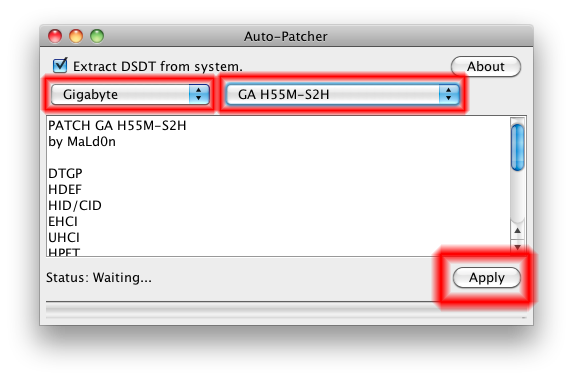
Run DSDT Auto-Patcher(Windows) and copy the generated DSDT to the Extra folder or root of the HD(use MacDrive) -
Instalação do Lion via USB usando Chameleon / GM e FINAL
MaLd0n replied to MaLd0n's topic in Guias & Tutoriais Hackintosh
no Windows o DSDT vai ser gerado no desktop use o macDrive que vc vai ter acesso ao HD do Mac pelo Windows coloque o DSDT na raiz da partição do Mac -
Instalação do Lion via USB usando Chameleon / GM e FINAL
MaLd0n replied to MaLd0n's topic in Guias & Tutoriais Hackintosh
o problema é o USB que nessa mobo precisa de "fix" use o Auto-Patcher Windows e coloque o DSDT gerado no HD do Mac, use o MacDrive o USBBusFix=Yes se vc não tem como digitar não vai adiantar -
Instalação do Lion via USB usando Chameleon / GM e FINAL
MaLd0n replied to MaLd0n's topic in Guias & Tutoriais Hackintosh
Usa o Auto-Patcher e coloca o DSDT ou na pasta Extra ou na raiz do HD -
Instalação do Lion via USB usando Chameleon / GM e FINAL
MaLd0n replied to MaLd0n's topic in Guias & Tutoriais Hackintosh
qual é o seu hardware? placa mãe, processador, vídeo, etc -
:S the same patches your GPU is supported?
-
tenta com a NVEnabler na pasta S/L/E e dê dois cliques no Kext Utility, se não funcionar tente trocar as saídas
-
Instalação do Lion via USB usando Chameleon / GM e FINAL
MaLd0n replied to MaLd0n's topic in Guias & Tutoriais Hackintosh
tenta com USBBusFix=Yes -
Instalação do Lion via USB usando Chameleon / GM e FINAL
MaLd0n replied to MaLd0n's topic in Guias & Tutoriais Hackintosh
vc tem de instalar a "Extra Lion" e o "Chameleon" no pen drive e depois dar o boot pelo pen drive -
para o vídeo use o OpenGLExtensionsViewer http://www.realtech-vr.com/glview/download.html
-
não sei sobre esse problema do DVD sobre o vídeo vc vai saber se está com aceleração se barra superior estiver transparanete, vá na pastaApplications e abra o Xadrez.app
-
mas é justamente isso mts mobos não aparecem mesmo, um bom exemplo são as Gigabyte isso é cosmético ainda não vi uma solução para isso
-
não uso kext para a controladora pois é identificada normalmente só não aparece (ICH7) no sistem profiles mas e não funciona vc tem de usar kext, vc pode tentar injetar ID de um macbook ICH7 tb, tem casos que funciona, mas não vai aparecer no system profiler
-
esse problema do vídeo tb acontece aqui, mas fica 2 segundos e entra normal nbo sistema, não me preocupei com isso pro DVD use a kext da sua controladora SATA/PATA
-
dsdt.02.zip
-
dsdt.aksfdkd .zip remove OpenHaltRestart, NullCPUPowerManagement and ElliottForceLegacyRTC add in boot.plist <key>GeneratePStates</key> <string>Yes</string> <key>GenerateCStates</key> <string>Yes</string> Use Chameleon RC5 Use smbios MacBookPro5,1
-
se vc está tendo problema com a VoodooHda + AppleHda...é melhor deletar a AppleHda ou então usar a AppleHdaDisabler
-
dsdt.Ramazarusx.zip
-
Hey Ramazarusx extract DSDT from Windows, Everest http://Olarila.com/forum/viewtopic.php?f=7&t=54 dsdt_p6x58-e_WS_Original.zip <-- problem
-
Instalação do Lion via USB usando Chameleon / GM e FINAL
MaLd0n replied to MaLd0n's topic in Guias & Tutoriais Hackintosh
SE vc já usou o DSDT Auto-Patcher, coloque essas duas kexts na pasta S/L/E ALC889a LION.zip -
boa config siga esse tutorial, use o HackBoot V6 http://Olarila.com/forum/viewtopic.php?f=3&t=53 SLI / CF não funcionam no Mac OsX