
MaLd0n
-
Posts
95,424 -
Joined
-
Last visited
Everything posted by MaLd0n
-

macOS Sierra 10.12.6 bootable USB for Intel PCs
MaLd0n replied to pernacabeluda's topic in Sierra (10.12)
OsxAptioFixDrv-64.efi.zip replace drive in Clover/drivers64UEFI if dont work u need use other, try it -
Não consigo Boot do pendriver na Gigabytes GA-g41mt s2!!!
MaLd0n replied to yttapro's topic in Hardware BR

-
Não consigo Boot do pendriver na Gigabytes GA-g41mt s2!!!
MaLd0n replied to yttapro's topic in Hardware BR
Usa o EL Capitan, segue esse tutorial, eu ainda não postei ele aqui no Ola http://www.insanelymac.com/forum/topic/323184-guide-el-capitan-sierra-on-intel-lga-775-motherboards-dsdt o seu processador se eu não me engano tem sse4.1 e dá pra instalar o Sierra -
macOS Sierra 10.12.6 bootable USB for Intel PCs
MaLd0n replied to pernacabeluda's topic in Sierra (10.12)
Follow it for create USB Stick http://Olarila.com/forum/viewtopic.php?f=40&t=5956 after install clover UEFI and replace with my folder http://Olarila.com/forum/download/file.php?id=8153 if u have a nvidia card, disable for install, just press bar space and check nv_disable=1 -
macOS Sierra 10.12.6 bootable USB for Intel PCs
MaLd0n replied to pernacabeluda's topic in Sierra (10.12)
bro, create a bootable manually or edit clover folder inside Olarila bootable. x99 dont work native, need many things -
essa acho que funciona nativamente
-
U can try it, is a old problem http://www.insanelymac.com/forum/topic/305938-fix-fix-for-black-screen-on-amd-7xxx-cards/
-
só usar a pasta do primeiro poste injetar a gpu que vc vai usar, se for web driver, use nv_disable=1, se for uma nvidia mais antiga use InjectNvidia, Ati faz tempo que não uso, não sei como está a situação.
-
Usa uma GPU off board
-
Testa aí CLOVER.zip
-
macOS Sierra 10.12.6 bootable USB for Intel PCs
MaLd0n replied to pernacabeluda's topic in Sierra (10.12)
post a photo -
posta a pasta clover completa
-
macOS Sierra 10.12.6 bootable USB for Intel PCs
MaLd0n replied to pernacabeluda's topic in Sierra (10.12)
CLOVER.zip -
talvez precise do ig-platform-id, reza a lenda que essas últimas versões precisam só do inject intel, no seu caso o fake id + inject intel
-
macOS Sierra 10.12.6 bootable USB for Intel PCs
MaLd0n replied to pernacabeluda's topic in Sierra (10.12)
send me Clover folder inside USB Stick -
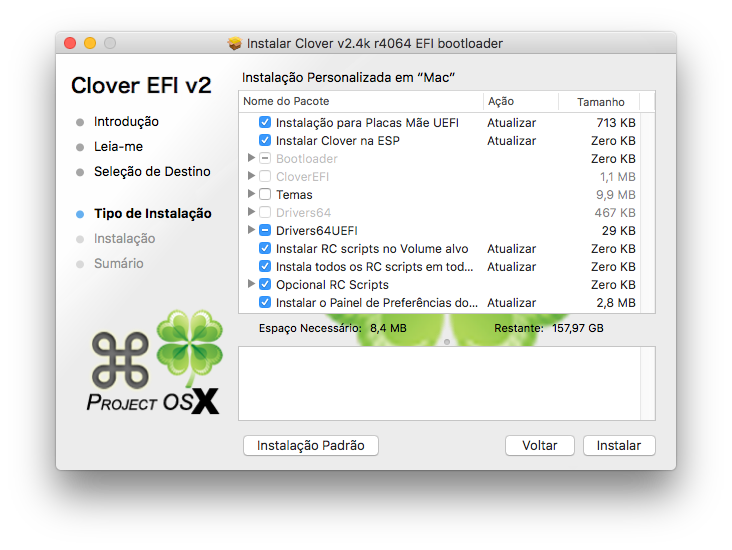
vc tem de usar fake IntelGFX 0x19168086 e Inject Intel com o Clover mais atualizado Clover_v2.4k_r4068.pkg.zip Nem o processador e nem a gpu kabylake tem suporte nativo, ainda!
-
qual a sua placa de vídeo?
-
macOS Sierra 10.12.6 bootable USB for Intel PCs
MaLd0n replied to pernacabeluda's topic in Sierra (10.12)
press "O" key is Clover boot screen -
macOS Sierra 10.12.6 bootable USB for Intel PCs
MaLd0n replied to pernacabeluda's topic in Sierra (10.12)
npci=0x2000 and nullcpupm, after u need patches Pike -
Qual o seu hardware? Placa mãe, processador, etc
-
Olha o post anterior. Vc tem de instalar com aquelas opções!
-
vc tem de usar UEFI Usa o Clover Versão 4049 Vc tá instalando na raiz do pendrive
-
usa todos em UEFI, device storage