plsh2me
-
Posts
27 -
Joined
-
Last visited
Everything posted by plsh2me
-
Full EFI folder with your DSDT - https://drive.google.com/file/d/1GBWoNDFhZxVi3oXjI6lw5EOIvn7uB8gb/view?usp=sharing Send me file with your DSDT - https://drive.google.com/file/d/1fkmI1yUSXlHLQu1tISb-o_gXz2eUoL1Q/view?usp=sharing Working OC folder - https://drive.google.com/file/d/183RcFh_K-DCM35K5niY5uJP0PH8z4L6-/view?usp=sharing
-
Working OC folder- https://drive.google.com/file/d/183RcFh_K-DCM35K5niY5uJP0PH8z4L6-/view?usp=sharing. I used the fake battery SSDT and ACPIBatterymanager kext only to get the battery icon, but not working and without these also lose the trackpad. I uploaded the files again on google drive, if you need these - https://photos.app.goo.gl/cZ8mEhDHrq7zcp3e9 & send me with DSDT - https://drive.google.com/file/d/183RcFh_K-DCM35K5niY5uJP0PH8z4L6-/view?usp=sharing. Thank you
-
OK, Thank you. I installed the DSDT, put the smcbatterymanager & ECenabler kexts in to the kexts folder. No battery, also tried without ECenabler kext, remain same. I found on PCI - Signal processing controller, serial bus controller & memory controller has no driver installed (please tell me the specific kexts for the devices). See the picture - https://www.mediafire.com/file/611imooy8rycf5b/PCI+devices.png/file In System preferences> No trackpad found. And with this DSDT - can't boot in windows (in boot logo it round the circle for a while then restarts). May be you will find details in new send me file - https://www.mediafire.com/file/m7bgomhxrlvuejn/Send_me_Palashs-Air_with_dsdt.zip/file. For pci device details - Report surface.zip
-
OK, Removed the fake battery and xosi ssdt's, removed the patches from config. Also removed the smc battery manager kext. Then rebooted and extracted the send me file - https://www.mediafire.com/file/vm5d2uu2jn9muw1/Send_me_Palashs-Air.zip/file Thank you.
-
No effect. As per this rep. the surface pro 7 uses different method (_SAN) for battery. So the available kexts will not work. For now it should be good for me to find a solution for graphics issue. You can see the dsdt of its, may be you find something new. Thank you
-
@MaLd0nHi, I have installed macOS Big Sur on my Microsoft Surface Pro 7 (i5 1035G4, Iris plus graphics, 8gb/128gb). It has the display blinking problem. And the battery not working (got icon only by using fake ssdt & smc battery kext). May be proper dsdt and config can solve this. Please help me to solve the graphics issue. Here is the send me file - https://www.mediafire.com/file/zjw3ekhxs7antos/Send_me_Palashs-Air.zip/file Thank you
-
[Guide] Hackintosh Cosmetics PCI Devices with Hackintool
plsh2me replied to MaLd0n's topic in Guides and Tutorials
Hello, Is it good to add all pci device lists on the config.plist/device properties (macOS bigSur under opencore bootloader) or add only the devices need to patch? -
Hello, I need to patch dsdt for acer aspire 3. I'd really appreciate your help. Thank you Results.zip
-
Sorry mistakenly quote the wrong comment. Pasted dsdt & install kext. No HDMI device has found on About this mac & System Preference. Thank you Palash
-
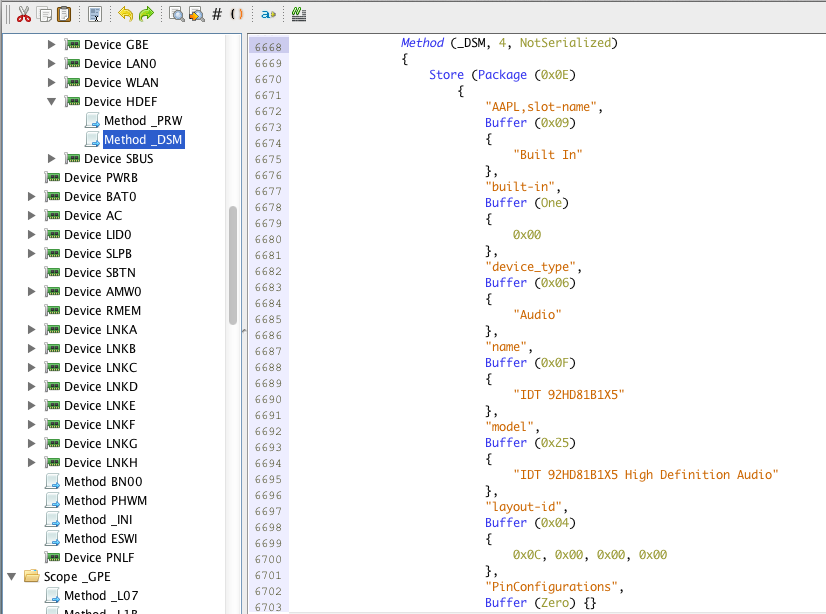
Pasted dsdt & install kext. No HDMI device has found on About this mac & System Preference. Thank you Palash
-
You can download it from this comment. Thank you Palash DSDT n ioreg.zip
-
Hi Mirone, Do you have any idea, what is the default HDMI dev_ven. of ATI Radeon HD 4670 on real iMac. Cause I have patched my graphics kexts by replacing shrike framebuffer personality of this card & my graphics working fine. Don't know ATI 4670's HDMI dev_ven to replace mine 1002_aa38 on kext 4600controller.kext . Want to try HDMI with guide - http://www.tonycrapx86.com/hdmi-audio/28623-lion-hdmi-audio-part-3a-kext-edits-amd.html This situation, more sure will not get Mic, New project HDMI . Do you can help? Thank you Palash
-
Speaker & Headphone - Ok. Line In recognised as input device, but "The selected device has no input controls" . Thank you Palash
-
Anyway you have tried heartily. Thank you so very much,dedicating time for me. Palash
-
Kexts 1&2- Speaker+Headphone - Ok. Internal Mic- "The selected devices has no Input controls"; HDMI not listed on About this Mac>audio. Kext 3 - No input & out put device found . Except HDMI, all four devices on list of About this Mac. Thank you Palash
-
Replaced DSDT And tested all with Skype. test1- Both output - Ok, No Mic (int./ext.). On About this Mac> Missing HDMI/Displayport output on device list. test2- None of device found on system pref. & On about this Mac> all devices are listed. test3- Both output - Ok, No Mic(int./ext.) volume lebel. all devices are listed. None of them auto detect external Mic. Also tested with Skype , if happen something . Thank you Palash
-
Saying that - when I plug in Headphones, Internal Speaker changed to Headphones, but Internal Mic not changing to External Mic !!! So it is not auto detecting. Tested again with Skype - no input lebel. One positive thing- can move the input volume. mic.tiff I am sending my ioreg, DSDT extracted from windows (only compiled it, nothing else) and DSDT, which is using right now. Thank you Palash DSDT n ioreg.zip
-
Speaker & Headphone - Ok. Internal Mic has no input volume . And guess external Mic not added on input device. Thank you Palash
-
With this one no sound at all .No devices found on System Preferences. On About this Mac >all devices are listed. Thank you Palash
-
For the very first time seen some progress No more "The selected device has no input controls". Now the device haas no sound . mic.tiff On About this Mac>audio> All devices on list. Checked with plug in external mic, not working. Even on System Preferences>Sound>Input device - not changing to External Microphone. Thank you Palash
-
I have already added HDEF patch on DSDT. Tried both of your kexts. For kext test1 -speaker & Headphone ok, No int. & ext. Mic (selected device has no input controls ) as before, All devices are on the list. For kext test2- Nothing working!!!, All devices on the list(On About this Mac). Actually main problem is Mic, yet not found a kext that can make Mic working!!! Thank you very much for your effort & hope you will find a solution for me. Palash

-
Mirone, Do you have time to give a simple effort to help me to patch my IDT 92HD81B1X5 on ML. I tried your patched kext working only speaker, No mic & HDMI. Here attached my audio files Audio files.zip . I think you should remember me on other forum . Thanks Palash
-
I am using edited dsdt. also set generate P & C states. booting with this, as I saw from log info - FADT: Using custom DSDT! Found ACPI CPU: P000 Found ACPI CPU: P001 Found ACPI CPU: P002 Found ACPI CPU: P003 SSDT with CPU C-States generated successfully P-States: min 0x9, max 0x13 SSDT with CPU P-States generated successfully RSDT: Added 2 SSDT table(s) FADT: ACPI Restart Fix applied! FADT: Using custom DSDT! Added 2 SSDT table(s) into XSDT Starting Darwin x86_64 Boot Args: boot-uuid=0B6F285E-7908-3C4F-9207-E5491999761D rd=*uuid Any idea?
-
Update: Removed Nullcpupowermanagement kext & evoreboot.kext But CPU temperature is too high 60+ !!!!! What can I do?
-
Hi, Can I remove NullCPUPowerManagement.kext now?