pinkertonb95
-
Posts
14 -
Joined
-
Last visited
Everything posted by pinkertonb95
-
DSDT Request for kabylake Samsung running Monterey
pinkertonb95 replied to pinkertonb95's topic in DSDT & Patch Requests
OK I did that Im attaching the sendme file. I have no brightness on my display its all dark. and no sound. and my trackpad is still not working. I can live without the track pad but the darkness of the display is killing my eyes. I would also like to get the sound working. Any suggestions?? It wont let me attach the send me file because its 5.4MB and goes over the max file size. -
So I've been working on this for two days now. Finally gave in to come ask for some help. Have a Samsung spin book 7 with a intel core i7 processor and a Kaby Lake intel hd 620 graphics. I have the graphics on my laptop working but I also need them to work through either my HDMI or USB C. I had them working in older versions of Mac OS but I can't seem to figure it out now. the external monitor has picture but it is a very bad flickery picture. Also my track pad isn't working along with my audio. which we had working on older versions also. The sound card is Realtek ALC256 and I forget what the track pad was. Ive been using my old DSDT and a.new config file I made based off of the ones here on the site. I will attach the send me file but any help I could get would be greatly appreciated. So Far that's all I've found out that was wrong. Thank you. Send me Brandons-MacBook-Pro.zip
-
The sound on my desktop is still not working for some reason and the graphics do not seem to be working correctly its showing up as 7MB. I have attached the Send me file. Please let me know if you need something else. Thank You. Send me DESKTOP-6OAOS2S.zip
-
I just installed Mojave on my desktop and the audio isn't working, there are graphics glitches and that's all I've found so far but I am wondering if you could make me a DSDT for my EFI folder. I am attaching the send me file thank you. Send me DESKTOP-6OAOS2S.zip
-
So my laptop was running great and then I installed Mojave.... Everything seems to be running fine except for the external display which was working fine on High Sierra. I also think there may be a problem with the usbs on my system. I'm using the DSDT that you helped me with from High Sierra. When I plug in the external display it just flickers. I use the external display when Im at home so Im wondering if you could help me fix it. Also I'm not sure if its power management or what but its running louder now that I upgraded and I did a clean install not an upgrade so I don't know why I said upgrade. Thank You for your help and time. I have attached the send me file below. Send me Brandons-MBP.zip
-
Random question, I don't know that much about Mojave as far as the hackintosh side of things go so will I need a different DSDT for Mojave or will the one for High Sierra work?
-
Here you go, the only thing that isn't working that I would like to work is the HDMI audio for an external display. I had it working at one point but that was with the fake PCI ID kexts and some edits to clover. Do you have any ideas for that?? Send me Brandons-Laptop.zip
-
Track pad is working now. Than You!
-
Alright I removed the FakePCIID and added the clover file. It booted faster but Still had a few errors. The battery is showing up now but it says its not charging. The keyboards working but the track pad is still not working. Send me Brandons-Laptop.zip

-
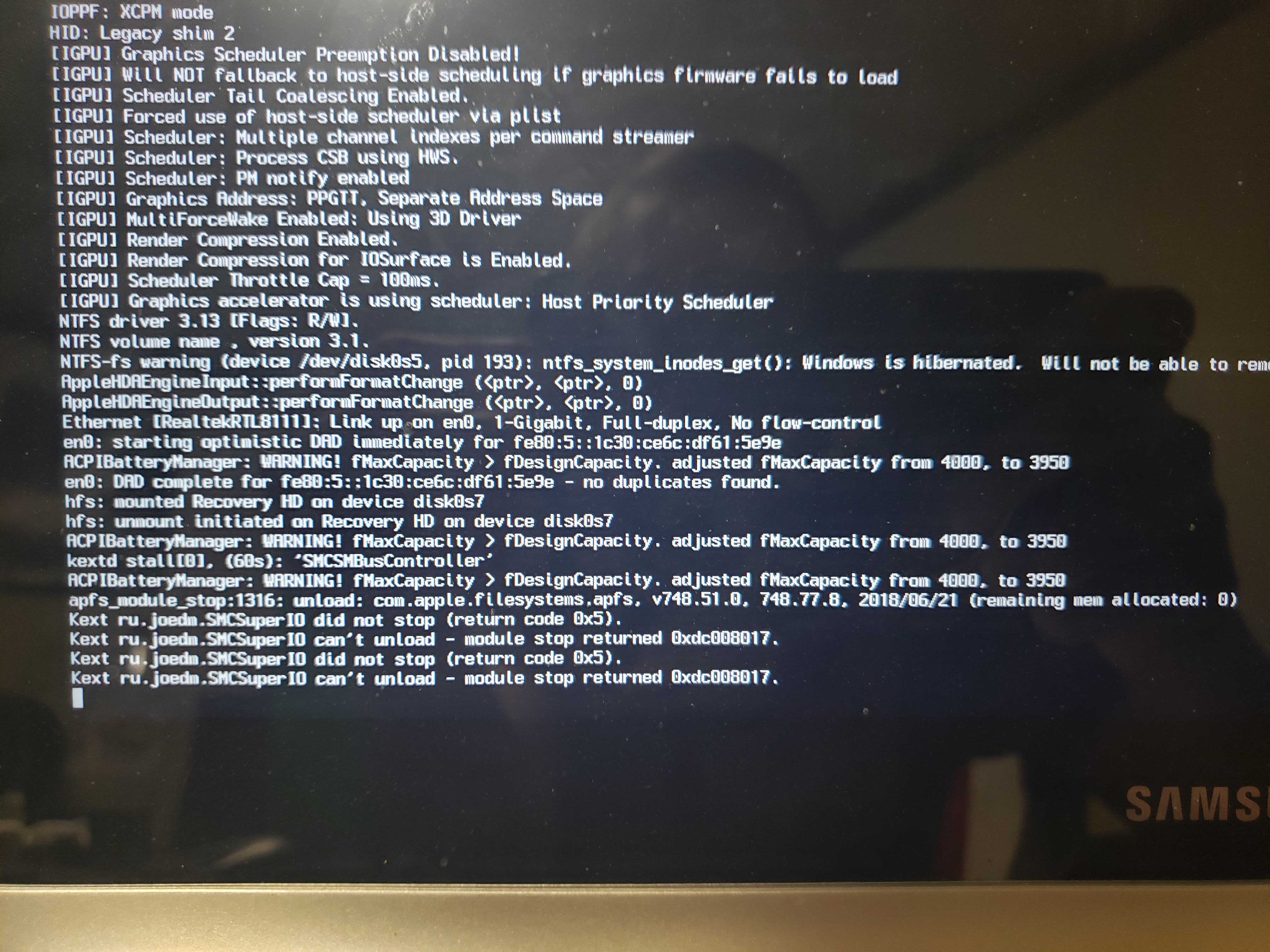
So after I installed the new clover file it wouldn't boot. It was stuck on the black screen with ACPI errors. The notebook model is included in the pictures. I also attached a new send me file. I used my install USB to get back in. Added in 16 minutes 20 seconds: Alright I finally got it to boot with the new clover folder you sent. Here is the send me from that. Send me Brandons-Laptop.zip Send me Brandons-Laptop.zip
-
So I rebooted after I added the new clover file and it freaked out for about 5 min before it booted. The sound now works through the internal speakers.The audio through the usb c doesn't work tho and I had it working at one point. The track pad worked for about 5 seconds after startup. Heres the new Run me file and a pic of what it did during the restart. Thanks. I forgot to add that the battery is still not working. Send me Brandons-Laptop.zip
-
So Ive got the keyboard working sometimes but then its stops working. Ive been trying to patch the DSDT for the battery and I2C, and Audio but I have been unsuccessful. I'm wondering if I could get some help with the DSDT patching since I can't seem to figure out how to do it. If you need anything Ill be happy to provide it for you. I think my audio codec is ALC256. I'm attaching a new send me file just in case you might need it. Thank You. Send me Brandons-Laptop.zip
-
"> -Battery https://Olarila.com/forum/viewtopic.php?f=28&t=8208 -Video https://www.insanelymac.com/forum/topic/335018-intel-fb-patcher-v151/ -Brightness https://bitbucket.org/RehabMan/applebacklightfixup -I2C https://github.com/alexandred/VoodooI2C Added in 1 minute 46 seconds: [ref]hulliver[/ref], just remove HS11 in uia_exclude flag in boot tab Added in 1 minute 49 seconds: [ref]intraco[/ref], DSDT.aml.zip Im having a problem with the laptops keyboard and trackpads and the battery. Any recommendations on how to make it work?
-
Here is my send me file. Just got High Sierra installed Trying to get the battery, HDMI audio, and Audio working. If you need anything else just let me know. Thank You. Send me.zip