Flo Rin
-
Posts
37 -
Joined
-
Last visited
Everything posted by Flo Rin
-
Thank you!
-
Hallo MaLd0n,Please help me with a full patch for Gigabyte Z390 Designare. i7 8086k, Sapphire Radeon RX 5700 XT, Wifi: BCM943602CS, iGPU in headless mode, iMac19,1, OC 0.8.3, BigSur 11.6.8Thank you very much! Send me iMac.zip
-
Thanks for all your help and hard work. Do I need any ssdt for thunderbolt?
-
Hallo MaLd0n, Please help me with a full patch for my z390 designare. Gigabyte Z390 Designare, i7 8086k, Sapphire Radeon RX 5700 XT, Wifi: BCM943602CS, iGPU in headless mode, iMac19,1, OC MOD 080, BigSur 11.6.5 Thank you very much! Send me iMac.zip
-
Everything is working great! Thanks!
-
Greetings MaLd0n, Could you please help me with a custom DSDT for my system. Thank you very much! Gigabyte Z370N WIFI Intel i5-8600K BCM94360CS2 WIFI Sapphire Pulse RX 5700 XT 8 GB Send me.zip
-
Hello [ref]MaLd0n[/ref], Could you please tell me if the method "Native USB Fix" https://Olarila.com/forum/viewtopic.php?f=28&t=10171 Is working in OC? Thanks a lot!
-
Super! Thank you!
-
Hello [ref]MaLd0n[/ref]! I did 2 thinks: disabled the CFG Lock and enabled the Legacy RTC into my UEFI bios. Now I can boot with OC without a patched DSDT. I really appreciate your help. Regards! Send me iMac-Pro.zip
-
Thanks a lot!
-
Yes with your dsdt is ok. In my previous post you have the files after i boot the oc with your dsdt https://Olarila.com/forum/viewtopic.php?p=87073#p87073
-
Hello [ref]MaLd0n[/ref]! I copy you EFI folder on USB stick and boot my system and now I am stuck on this screen. I did not make any changes to the EFI folder and not using the custom DSDT(made by you). If I use the custom DSDT my system start without any problems. There is some magic in that DSDT https://i.imgur.com/Iti8MJl.jpg' alt='IMGUR>'>
-
Hello [ref]MaLd0n[/ref], please help my with my files. If you need any more info please let me know. Thank you. Gigabyte Z370N+BCM94360CS2 i5-8600K SAPPHIRE RX580 PULSE 8GB Mojave 10.4.5 Send me iMac-Pro.zip
-
Hello [ref]MaLd0n[/ref], unfortunately I can not boot OpenCore without a patched DSDT. Do you think is OK to start with a patched DSDT (made by you) and add the original ACPI files extracted in Clover with F4? Thanks.
-
Thank you very much for your help. The error is still there but all other thinks are OK.
-
Thank you for your help. USB is working fine but with the now EFI I get this error: ACPI Exception: AE_BAD_PARAMETER, (AppleACPIPlatform) ACPI Exception: AE_BAD_PARAMETER, (AppleACPIPlatform) Could not install PciConfig handler for Root Bridge PCI0 (AppleACPIPlatform) Could not install PciConfig handler for Root Bridge PCI0 (AppleACPIPlatform) (20160930/evrgnini-339) (AppleACPIPlatform) (20160930/evrgnini-339) I have CSM enabled in my bios. Do you think is related with this? Thank you. Added in 7 minutes 59 seconds: Sorry I forget to add the log files. Send me iMac.zip
-
Hello [ref]MaLd0n[/ref], could you please help me and take a look at my files. I just updated my bios to a new version. The actual DSDT is from the previous bios version. Gigabyte Z370N+BCM94360CS2 i5-8600K SAPPHIRE RX580 PULSE 8GB Mojave 10.4.4 Thank you very much! Send me iMac.zip
-
Hi MaLd0n! What I did: Removed the PLS section from SSDT, compiled the file and put it in pached folder. Now I don't have anymore the error. Do you think is ok? Thanks!
-
Thank you very much!
-
Unfortunately is the same situation Send me iMac.zip
-
Thank you for replay. I have exactly the same error with r4910 Send me iMac.zip
-
Hi MaLd0n! Starting with Clover r4899 until the last version I have the following errors in my logs: (AppleACPIPlatform) ACPI Error: (AppleACPIPlatform) ACPI Error: (AppleACPIPlatform) [\_SB_.PR00] (AppleACPIPlatform) [\_SB_.PR00] (AppleACPIPlatform) Namespace lookup failure, AE_NOT_FOUND (AppleACPIPlatform) Namespace lookup failure, AE_NOT_FOUND (AppleACPIPlatform) (20160930/dsobject-207) (AppleACPIPlatform) (20160930/dsobject-207) (AppleACPIPlatform) Executing subtree for Buffer/Package/Region (AppleACPIPlatform) Executing subtree for Buffer/Package/Region (AppleACPIPlatform) ACPI Exception: AE_NOT_FOUND, (AppleACPIPlatform) ACPI Exception: AE_NOT_FOUND, (AppleACPIPlatform) Could not execute arguments for [PSL_] (Package) (AppleACPIPlatform) Could not execute arguments for [PSL_] (Package) (AppleACPIPlatform) (20160930/nsinit-513) (AppleACPIPlatform) (20160930/nsinit-513) If is helping you, in the Clover r4899 release notes say: “make byte ACPI access, optional ASPM”. My system is: Gigabyte Z370N, WIFI BCM94360CS2, i5-8600K, MSI RADEON RX560 AERO, Mojave 10.14.3. Thank you very much for your help! Send me iMac.zip
-
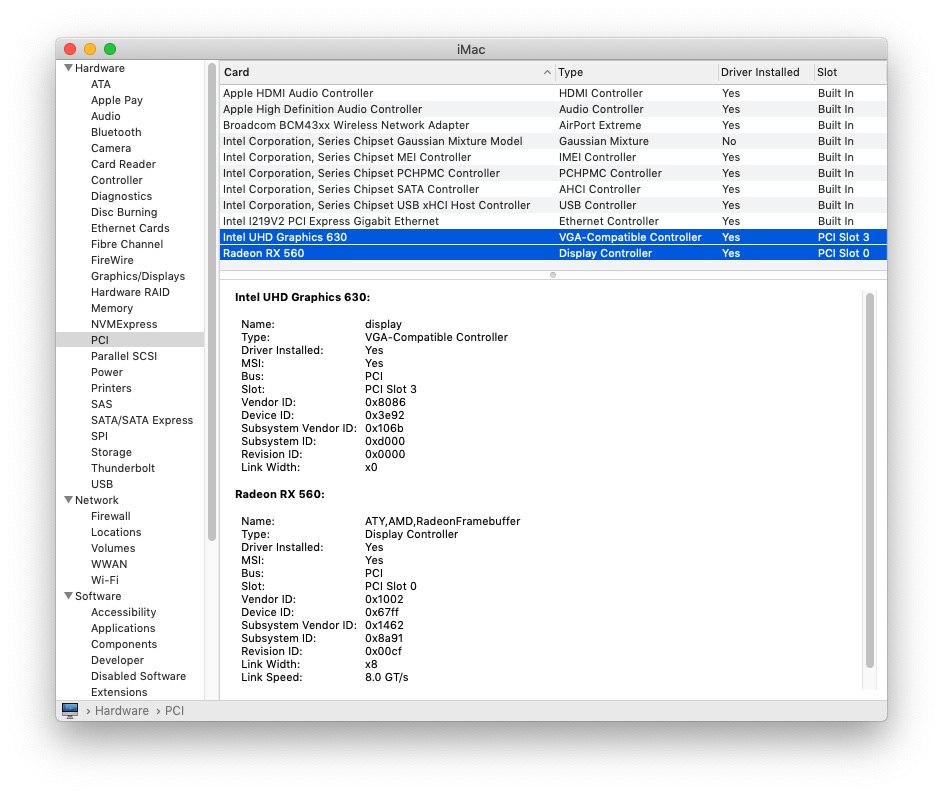
Hello, in my case the Intel UHD Graphics 630 is not displayed as "Display controller" and "Build In". Do you think is OK? Thank you very much!

-
Hello, regarding setting the usb prot limit in 10.14.1. Could you please tell me what are the USR1, USR2 ports and if I can safely add them to the exclude list. My board is Gigabyte Z370N WIFI. Thank you!
-
Thank you very much. Everything is fine