andhirto
-
Posts
39 -
Joined
-
Last visited
Everything posted by andhirto
-
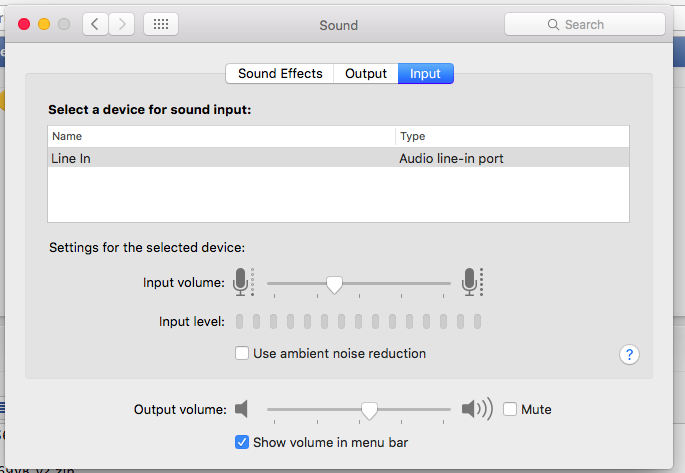
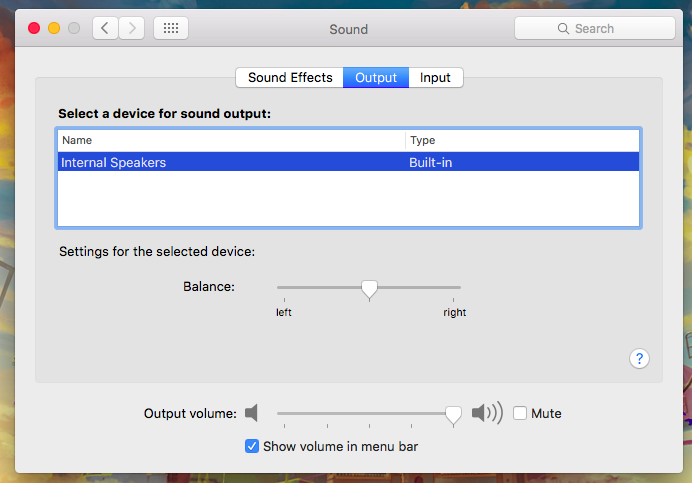
Forgive me for late giving feedback Mirone, this work very well and perfectly like it... Audio Output: Audio Input : Thank you very much Mirone..

-
After I remove AppleALC.kext and using this DSDT, Because my laptop only have 1 port sound jack, the sound after patched only work for line-in sound like this. Before i plug in my headphone/headset : After i plug in in my headphone/headset : But on my output device didn't work, after i plug in my headphone/headset my sound keep ringing on my internal laptop speaker. Here i include generate from "RunMe.app" => http://www.mediafire.com/file/iie9hlxeiefysfv/Send%20me%20192.168.0.101.zip
-
I am sorry late for give feedback, I have to try it and the problem is not fix... First, I added AppleHDA.kext using kext utility, and then add patch DSDT like this... Then, set clover plist like this... But my sound didn't work like it... This current DSDT patched... DSDT-patched.zip Thanks mirone...
-
This codecdump file CodecDump.zip
-
Ok, I will do it and send soon. Thanks mirone..
-
I have to tested using 2,3,4,5 and 6 and it still same condition. how to i dump my audio codec?
-
I am using layout_id = 3 via clover and i have tried use 0x100004, 0x100100, 0x100202, 0x100203 layout 1-10, 11, 13, 14, 15, 16, 18, 19, 20, 27, 28, 29, 32, 33, 35, 40, 76, 93, 99, 127 but nothing work perfectly. Runme file : http://www.mediafire.com/file/iie9hlxeiefysfv/Send%20me%20192.168.0.101.zip
-
Hello.. Today, i need help for fixing realtek ALC269. After i install Elcapitan till now it is not any problem with my sound, but when i to try connecting to external speaker or headphone. it turn out my sound did'nt work perfectly. My speakers or headphones do not sound, but the sound keeps on my laptop. I have a teamviewer for make easy for investigated the problem, because i don't know how to patch AppleHDA T_T Thanks for helping...
-
...
-
Yes, i have do it and it still same, shutdown didn't work
-
After i checked, i install clover like this.. i checked this option...
-
How to check it mald0n?
-
Using this dsdt still same, i think using restart button to shutdown my laptop is the best solution for now
-
Thanks Mald0n, wanna try this
-
Helo mald0n, can you help me again for correcting my dsdt and other config? this problem about shutdown / restart. According to the first topic, my laptop can't completly shutdown. But using current config shutdown still not fix, but when i to try restart button, my laptop suddenly shutdown ^_^, we very happy because my laptop can shutdown now. but it's not perfectly Can you helpme to fix my restart & shutdown? Runme File http://www.mediafire.com/file/iie9hlxeiefysfv/Send%20me%20192.168.0.101.zip Thanks Mald0n ^_^
-
please helpme... after restart stuck at here...
-
Ok mald0n, we want to try to update my os.. i hope that can running without any problem ^_^
-
My currently os using Retail installer + Clover, it is safe to update using app store?
-
Hello,... Today i use El-Capitan 10.11.3 And currently also have new update to El-Capitan 10.11.6 from app store It is safe update using/via app store now? or It need special action like install/update using usb installer or another way... Thanks for helping.. ^_^
-
Oh, ok Mald0n, thanks for information ^_^, best for you Mald0n..
-
On iddle / after startup the temp between 55 - 59, and this full application after we use some application chrome, vscode, terminal, lampp, itunes is it normal temp? ^_^
-
Hello.. I want to ask about my laptop temperature using El-Capitan 10.11.3... This overview about my temperature... Is it normal condition? if not, please help me to fix this fan controlling ... and this is the spec of my laptop: - Asus A42JC - Intel i5 M460 @2.53GHz - Ram 8GB - Intel HD 1st Generation - HDD 500GB Send me files: http://www.mediafire.com/file/iie9hlxeiefysfv/Send%20me%20192.168.0.101.zip Thanks for helping...
-
Thanks Mad0n... we will to try this ...
-
Ok Mald0n, is the step like this? 1. Remove Method _DSM in HDEF 2. Inject via Clover Here 3. Using Layout ID Here Forgive me Mald0n If I ask a lot, because I'm still a beginner and starting to learn hackintosh especially dsdt T_T...
-
Thanks, i wanna to try... ^_^ How to change and detect my layout-id for my codec? is setting on config.plist or on dsdt?