barfusti
-
Posts
12 -
Joined
-
Last visited
Everything posted by barfusti
-
Hello everyone, I have a Dell 7577 series laptop with these specs; Intel i7-7700HQ >>>>>>> Nvidia 1050 TI >>>>>>> 16 GB RAM >>>>>>> Samsung 128 GB SSD. I am running Catalina and installed supplemental update. I can boot into my hack and use it for daily use actually. But I am especially suspicious about power management. My laptop fans are working loudly more than usual. Lately I have made changes in clover here and there but I am not sure if they are necessary or not. I am not also sure about if I harm my system. There is a new thing with battery after installation of latest VirtualSMC.kext and its sensors. Battery indicator now says "Replace Soon" or "Service Battery" randomly on each boot. When I check on bios, it says battery life is excellent. Windows 10 does not give me any error regarding to battery also. I have 2 SSDs on my laptop. One of them is for macOS, the other one is for Windows 10. I am uploading my EFI Folder here. Is there anyone who can check it out to say me if I had power management or other things in general with my system. Should I remove any "ssdt patch, kext or config patch" ? Should I add something? When I boot with -v flag, there are some error codes like ACPI Error but I can't see them because it is too fast to notice. I am mostly suspicious about my power management. Folder includes original ACPI folder. I removed theme folder and 2 kexts which is for usb wifi dongle by chris1111 due to reduce zip file size. I have no kexts installed to /L/E or S/L/E If you check and help me, I will be glad. For an additional request, depending on my clover folder and system specs, is there anyone who can make Opencore boot loader EFI folder for me to try it out? I read read me pdf but it is beyond my English and software knowledge. Thanks in advance. @MaLd0n & others. barfusti Clover EFI.zip
-
At first, I didn't try port limit patch but at the end I gave up there. Again I read tutorials I added kexts like fakepcid ... I tried my chance still no USB ports. Actually one of my port is working. My touchpad and keyboard works well. But things like two others USB ports and webcam camera don't work. I provide you my files , can you check for me again please? Send me Alis-MacBook-Pro.zip
-
Hi, I wasn't using macOS or hackOS for a time, then I tried to install Mojave and it all went nice nearly. I am not sure all of the parts but the ones I need operate except for webcam and usb 3 ports as far as I know so far. My specs are in general as i7-7700HQ processor , Nvidia 1050ti graphic card. There is a zip file which contains my current EFI. It includes everything related to there from ACPI to kexts. Additionally there is an AIDA64 report which was taken in Windows 10 operating system. Can anybody patch my pc ? I can provide further information if anyone is interested. Thanks for taking time. [ref]MaLd0n[/ref], if you are interested again as you did before I will be glad. ------------ My current EFI folder --------------- https://drive.google.com/file/d/1_s-Yn6dlhpSFD3ijDHtHhjA3grV06N6Z/view?usp=sharing ---------------------------------------------
-
Mr MaLd0nProbably I don't know how to check it. I followed the guide and it says something about windows part and as you see in the post #10 I attached that picture. I don't know how to check other ways. When I have time, I can check the devices one by one so maybe I can solve that. Can you suggest me anyway for audio? What can I do and where to look for misnaming graphic and audio devices? It is possible that my Audio codec is different? Thanks for being interested until now.
-
Mr MaLd0n , with SSDT-DPGU.aml I can't make any progress. I changed it with the one I had before and now it seems working. I installed high Sierra again with the knowledge and files you provided to me , so far so good except for audio part. There is no output or input devices in system preferences>audio. Here is the list I have done so far: * I changed my layout id to 13 and 56 in config.plist, Neither of them is working. Generally they say layout id 13 for this alc256 codec. I have AppleAlc.kext + lilu.kext + shiki.kext in /EFI/CLOVER/Kexts/Other I downloaded RehabMan's codeccommander.kext , I tried this kext in both EFI/CLOVER/Kexts/Other and Library/Extensions and no success. I rebuild the cache within terminal. I added SSDT-256.aml to CLOVER/ACPI/Patched Ioregistryexplorer gives me the result I attached when I type "hdef" I have untouched AppleHDA.kext , there is no kext like VoodooHDA, HDADisabler ... I just installed the system and trying to keep it clean as much as possible Is there any way you can suggest to me, otherwise I go with VoodooHDA package to solve this. Which one do you prefer, AppleAlc or Voodoohda? Thanks again , I also attached the SSDT-NVIDIA-DISABLE.aml if you want to check out. Thanks for all you have done for me. SSDT-NVIDIA-Disable.aml.zip

-
So I placed the " DSDT.aml " to EFI/Clover/Acpi/Patched and problem is the same. After that I deleted " SSDT- DGPU.aml " and nothing changed. At the first flashing messages it is written more things but after that it keeps flashing the message : IOConsoleUsers: time(0) 0>0, lin0, llk1 IOConsoleUsers: gIOScreenLockState 3, hs 0, bs 0, now 0, sm 0x0 I have a 128 gb ssd+ 1 tb hdd on my laptop. Ssd part is installed with windows. I formatted 500 gb of 1 tb as HFS journaled and rest is Exfat. In boot options , ssd is the first if I want to boot into os x I push F12 and choose that disk. My clover bootloader is not the latest. Mine is 4380 but latest one is 4414 if I am not mistaken. Is it ok to download latest package and run it? In customize menu, what should I choose in this scenario? Mr MaLd0n, I appreciate all of the things you have done thanks a lot really.
-
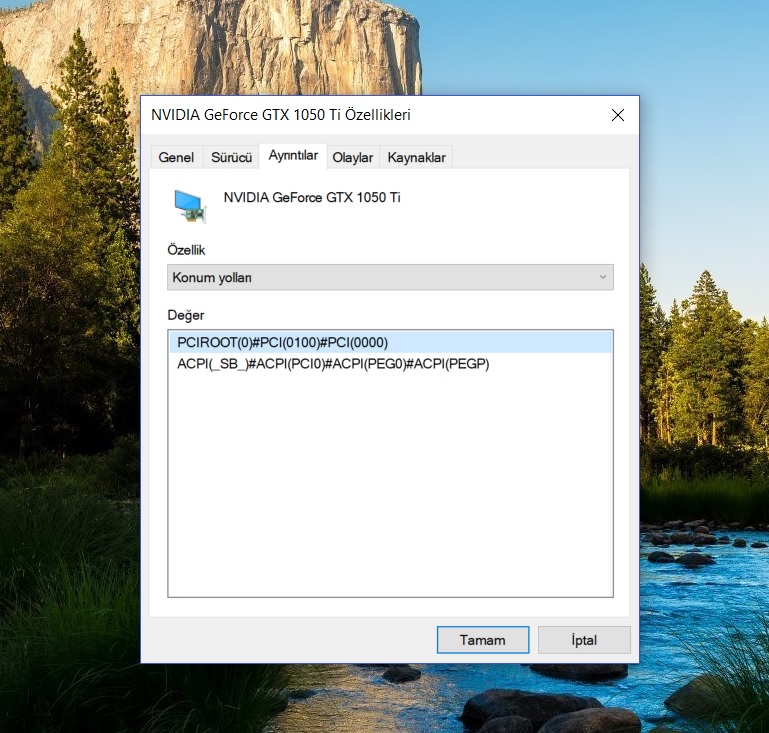
Mr MaLd0n, I deleted the EFI/CLOVER folder and paste the one you uploaded for me. Now I can't boot system it says while flashing : IOConsoleUsers: gIOScreenLockState 3, hs 0, bs 0, now 0, sm 0x0 For DPGU, I check device manager in Windows 10. I have a Nvidia Geforce GTX 1050 ti as the post you sent for the tutorial . It has the same PCIROOT.... ACPI(SB)#.... so I didn't do any modify , I just paste the SSDT-DPGU.aml to my EFI/CLOVER/ACPI/DSDT/Patched folder
-
Thanks for replying @MaLd0n I want to ask some more questions. I hope I don't bother you with my noob questions. First of all , I want to make a clean install again. So if I put the Clover folder you provided is it ok? Can I make the installation perfectly? What do I need for that? Which kexts according to my system? If I just disable my DPGU do I have to do anything else ? For battery, trackpad preferences, smbios, or any stuff I need? Trying to learn but most of the time it is tricky. Thanks again for providing me that Clover folder. You are the most helpful person in entire community.
-
So is there any news for me Mr MaLd0n, can you check the specs ?
-
So sir I pressed the F4 button when I was on Clover screen and this is my EFI/CLOVER/ACPI/Origin folder origin.zip
-
Thank you for showing interest to my topic @MaLd0n Here is the result you asked for. Send me Ali-MacBook-Air.zip
-
Hello everyone, I would like to install a fully working hackintosh as much as possible to my pc. I am a super noob, I need learning in time but actually I need expert hands to find my ways. I am trying to find guides, tutorials etc. to find my way, but even if they are so simple, I don't know how to do things. There are always saying like patch this , use this id ... but I don't know how to patch them, how to use that id. Now I am writing this message from a high Sierra build, maybe the latest one. It seems somethings work. For example my trackpad is working in its' way but I cannot see the settings in system settings because it says there is no one. I can't touch the click or pointer speed is too low for me. I tried the find trackpad.prefpane I found one I replaced it ... nothing changed for example I don't know if my nullcpu or stuff for cpus are working. I am afraid to make a harm to my pc I can't afford any other one in years I learned Geforce GTx 1050ti is not working, it is ok because I use mackintosh to surf internet watching videos and stuff like that. I am playing steam games on windows 10. Wifi card is not working it is ok I connected through cable. I made iMessage work but when I changed my smbios to macbook 14,3 for example my USB ports stopped working and I can't find a way. I choose MacBook Air 6,2 and it solved but does it matter for example? There are things I know there are lots of things I don't know. So I need help. I attach my Windows Aida64 report and Clover f4 acpi tables. Can someone here help me after looking this and guide me to run this system full as much as possible with kexts dsdts and necessary stuff thank you all in advance ACPI.zip ReportAida64.txt.zip