


Walldemar Serbia
-
Posts
51 -
Joined
-
Last visited
About Walldemar Serbia

-
 Maldon buenos dias, at the time of my writting, its OPENCORE finish no support? I quest Promox its going to be the future of the hackintosh from this point foward.
 -
This are the results of my new MacMini - Ultra Nothing to ENVY to this new Mac from my old XEON 2696v4-Xeon.png.zip
-
This is the EFI that I did the update with and in geekbench 5 S-816 M-12400, M- 64000 OG-58000 its working a little better then before but not yet as better than BIGSUR EFI.zip
-
Thanks, Maldon did try your advice but it was configure already that way and it didn't work and I didn't want to clear nvram neither reset nvram cause I seen with clear nvram at boot then the memory miss configure star showing and now that I got the system recognising all the memory didn't want to batter with that so I decide to copy and 077EFI version that I have and walla as soon I boot to desktop use system preference to check and sure enough it show the update and as off right now thats its what I'm doing, I will post a success or failure. Smooth as butter 2 restart on Monterey w/ 077 OpenCore and on my other drive w/ BigSur 3 restart w/ 077 OpenCore as well I quest I'm going to have to stick w/ 077 OpenCore for a while Don't know cause I was on 078 updated w/ OCTool and thats when I notice it recognise the update went to the tool and the tool didn't have 079 then went ahead and updated manually and still didn't show then came w/ the idea to try an older version 077 and walla a hit instead of a miss
-
Ok I will try that let know I.m using right now my BigSur drive cause I was updating that one and everything running like it should.
-
Good morning to all on this forum and to you Maldon, and my question is to ask if there is any Hipcups installing this new update, I ask because on my system in which its running very good thanks to you the update hasn't show up on my system preference even my self refreshing the update. I ask is there is any tweak to do the EFI is the security feature needs to be turn on, thanks for any advice guide from to solve this
-
X99 Deluxe II on BigSur finally
Walldemar Serbia replied to Walldemar Serbia's topic in Big Sur (10.16)
Malndon good morning at the time of me typing, This time around is to ask you or better yet tell you that I have noticed on system preferences under kext loaded don’t see the XCPM kext so don’t know if it’s good or bad at less she behaves like BigSur with a little less performance -
Walldemar Serbia changed their profile photo
-
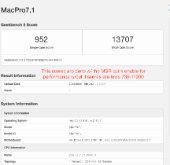
Hey MALDON thanks for promptly answer, but I just find out that when I order the MSI X99A SLI, they send me the PLUS version and there is a different between then two boards the non-plus has a U.2 port, support ECC, register and unregister memory and it has the MSR un-locked feature in BIOS. In the other hand the PLUS version n U.2, no ECC support and no MSR feature in Bios so you do guest I have the PLUS version, its a big disappointment for me because this board don't have that many hardware sharing irq like the ASUS, but that its out the way, but I have a question for you I'm running the RESTRICTED EVENT kext don't I'm supposed to deleted this kext if I have a DSDT made and in it the LPCB fix is been made on my DSDT so there is still a point for me to still use this KEXT, I may ask to you? thanks THIS IS GETTING BETTER scores in GB5: 952-S 13707-M
-
Hey for those on MONTEREY 21C52 and have a FENVI pci-e card wifi working but not Bluetooth I got good news for U I came across a quick fix don't if after reboot it goes back to be unrecognised but I just went to terminal and typed this command and viola the bluetooth icon came alive command': sudo pkill bluetoothd and if I get permission I will post where I get from. Enjoy!
-
Ok I will and the humble donation as well, dicho eso, today update Montery to 21C52 but no bluetooth fix yet on the mean time I have a dongle for my ear pots but everything update like it should like real MAC that is, thanks. ? ?
-
SOFTWARE UPDATE for everything IOs and MacOS
-
Hey MALDON I have got a MB sitting on my shelve for 3 or 4 years and that its a MSI X99A-SLI and that motherboard supports ECC memory and also have a CFG lock option to be disable and enable in BIOS not mOD need it I got two extra CPUS sitting around somewhere HAZWELL-E 5960X type so give me couple of week to gather all the hardware and if I can get it to running I might need to make another custom DSDT for it, it be same SMBIOS 8 core MacPro7,1. I will let know, Thanks.
-
Well finally delivered the video for my rig w/ MONTEREY working sleep happen but wake failed I.m not worry for that cause I mainly shut down my computer most of the times anyways. so the only concerns me its the Bluetooth but I can wait. no in a hurry. Thanks to: " The ACPI Eater, aka MALDON "
-
Honestly MALDON, in my opinion this bug its not about SMBIOS well don't get wrong its manifest mainly on MACpro7,1 cause its memory configuration yes but also in my humble opinion it back trace to systems that have got mod their bios to unlocked the MSR that sometimes after you been clearing the NVRAM tikering some other things others start happenings for example this one, and I said cause the problem have solved also have seen the problem in WINDOWS so what I do and don't ask how that could cause no clue, I removed the BIOS chip and battery for a while drain all the power first of course then do the process but everything back reset or clear CMOS ones more and at first boot it might still come back but next boot and when I said boot not resart Cool boot then the problem might go away, but the KEY here is not to reset NVRAM unless U really need to. LESSON LEARN and that what we are here for, TO LEARN from mistakes, THANKS. Oh one more thing I forgot to ask U Im in the process to do a video of the system let me know where I can post the link of the video or the video it self, Thanks again
-
Hey MALDON its me again and Thanks for info posted above , but this time its for me to ask you how to solved the issue here w/ MacPro7,1 Bios cause after while the complete memory configuration was show with no problem all recognise and now from the no where its dropping the 2 module configuration. What should I need to check cause that fix its was gone for while but it came back again.
